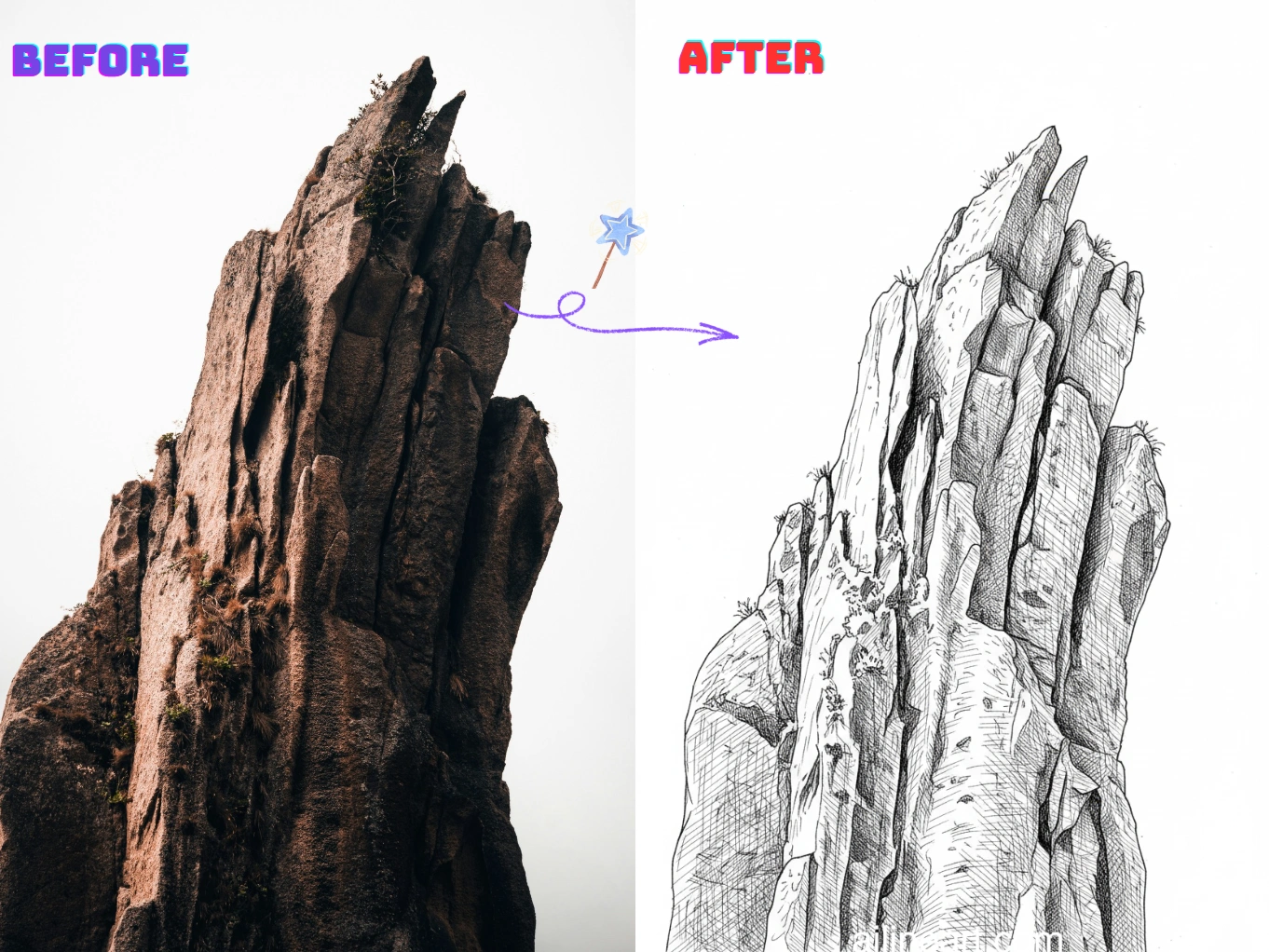
Bild zu Line Art Anwendungsfälle
Verwandeln Sie Fotos in Sekundenschnelle in saubere, druckbare Strichzeichnungen.
Porträt zu Strichzeichnung
Verwandeln Sie Selfies und Porträts in glatte Line Art mit klaren Gesichtszügen und minimalem Rauschen – perfekt für Geschenke, Avatare und Profilbilder.


Produkt- & Objektkonturen
Erstellen Sie scharfe Konturlinien aus Produktfotos für Handbücher, Mockups, Aufkleber und Entwürfe – sauber, konsistent und einfach zu bearbeiten.


Malvorlagen & DIY
Verwandeln Sie Haustiere, Landschaften und Alltagsszenen in druckbare Konturen für Malvorlagen, Bastelarbeiten und Unterrichtsmaterialien.


So verwendest du Bild zu Line Art
Folge diesen Schritten, um Bild zu Line Art zu verwenden

Lade dein Bild hoch
Wähle das Bild aus, das du mit Bild zu Line Art bearbeiten möchtest.
Prompt eingeben (optional)
Beschreibe optional, was du am Bild ändern möchtest.
Klicke auf ‚Generieren'
Klicke auf die Generieren-Schaltfläche, um den Prozess zu starten.
Bild herunterladen
Lade dein hochwertiges Line-Art-Bild herunter – bereit für dein Projekt.
Bild zu Line Art Funktionen
Erstellen Sie mit Bild zu Line Art saubere, hochwertige Line Art aus jedem Foto.
Saubere Kantenerkennung
Extrahiert automatisch scharfe Konturen aus Fotos und reduziert dabei Unordnung und Hintergrundrauschen für einen echten Line-Art-Look.
Anpassbarer Linienstil
Steuern Sie Linienstärke, Detaillierungsgrad und Kontrast, passend zu Ihrem bevorzugten Skizzen-, Konturen- oder Malvorlagen-Stil.
Hintergrundvereinfachung
Heben Sie Motive hervor, indem Sie unruhige Szenen in klare Konturen vereinfachen, die leicht zu drucken, nachzuzeichnen oder zu bearbeiten sind.
Hochauflösende Exporte
Laden Sie scharfe, hochauflösende Line-Art-Ausgaben herunter, die sich für Druck, Aufkleber, Handwerk und digitales Design eignen.
Schnelle Verarbeitung
Generieren Sie Ergebnisse in Sekunden dank optimierter Prozesse – ideal für Stapelverarbeitung und schnelle Iterationen.
Keine Installation erforderlich
Nutzen Sie es direkt in Ihrem Browser auf jedem Gerät – kein Download, keine Einrichtung, einfach hochladen und generieren.
Starten Sie jetzt mit Bild zu Line Art
Schließen Sie sich Tausenden von Kreativen an, die mit Bild zu Line Art Bilder in Line Art umwandeln.
Warum unseren Bild zu Line Art-Generator wählen?
Warum sollten Sie unseren Bild zu Line Art-Generator nutzen, um Bilder in saubere Line Art zu verwandeln?
Präzise Konturextraktion
Unser KI-Linienkunst-Generator erkennt Motivkanten und wichtige Details, um scharfe, konsistente Konturen zu erzeugen und unerwünschte Texturen zu reduzieren.
Foto-zu-Linienkunst-Generator mit einem Klick
Laden Sie ein Foto hoch und unser Linienkunst-Generator liefert in Sekunden saubere Line Art – kein Abpausen, keine manuelle Bereinigung.
Druckfertige Ergebnisse
Nutzen Sie den Generator, um kontrastreiche Strichzeichnungen zu erzeugen, die einfach zu drucken, auszumalen und zu bearbeiten sind.
Beliebt bei Bild zu Line Art-Nutzern
Erfahre, was Künstler und Kreative sagen, die Bild zu Line Art täglich verwenden.
"Die KI-Line-Art-Kolorisierung ist unglaublich! Sie versteht genau, wo Farben hingehören, und erzeugt wunderschöne Verläufe. Was früher Stunden dauerte, geht jetzt in Sekunden!"

Sarah Chen
Digitalkünstlerin
"Als Manga-Zeichner war das Kolorieren der Panels immer der zeitintensivste Teil. Dieses Tool macht das perfekt – die Farben bleiben innerhalb der Linien und die Schattierungen wirken natürlich."

Mike Roberts
Manga-Künstler
"Ich war zunächst skeptisch gegenüber KI-Kolorisierung, aber Bild zu Line Art hat mich überzeugt. Die Ergebnisse sehen handgemalt aus – meine Kunden lieben die lebendigen Farben!"

Emily Wang
Illustratorin
"Dieses Tool hat meinen Comic-Workflow revolutioniert. Die KI versteht die Struktur der Line Art und koloriert intelligent. Jetzt kann ich mehr produzieren, ohne Qualität einzubüßen."

David Kim
Comiczeichner
"Perfekt für schnelle Konzeptentwicklungen! Ich zeichne in Schwarz-Weiß und teste dann verschiedene Farbschemata sofort mit Bild zu Line Art."

Lisa Thompson
Concept Artist
"Als Student habe ich kein Budget für teure Software. Bild zu Line Art liefert mir kostenlos professionelle Kolorisierung – ideal für mein Portfolio!"

Alex Martinez
Animationsstudent
Häufig gestellte Fragen (FAQ)
Entdecken Sie häufige Fragen und Antworten zu Bild zu Line Art.
01Was ist Bild zu Line Art?
Bild zu Line Art ist ein KI-gestütztes Tool, das Fotos in saubere Strichzeichnungen umwandelt. Es extrahiert scharfe Konturen und vereinfacht Details für einen echten Line-Art-Look.
02Wie konvertiere ich ein Bild in Line Art?
Laden Sie Ihr Bild hoch und Bild zu Line Art generiert automatisch eine Line-Art-Version. Sie können Einstellungen wie Detailgrad oder Linienstärke anpassen und das Ergebnis herunterladen.
03Wie funktioniert Bild-zu-Line-Art?
Unsere KI analysiert Kanten, Kontraste und wichtige Strukturen in Ihrem Bild und wandelt sie in vereinfachte Konturen um, wobei wichtige Details erhalten bleiben.
04Brauche ich Zeichenkenntnisse für Bild zu Line Art?
Nein. Bild zu Line Art ist für Anfänger und Profis konzipiert – einfach Bild hochladen und eine saubere Strichzeichnung erhalten, ohne manuelles Abpausen.
05Kann ich die generierte Line Art kommerziell nutzen?
Ja, mit Bild zu Line Art generierte Line Art kann gemäß unseren Nutzungsbedingungen für kommerzielle Projekte verwendet werden. Stellen Sie sicher, dass Sie die Rechte an den hochgeladenen Bildern besitzen.
06Welche Bilder funktionieren am besten?
Bilder mit klaren Motiven und gutem Kontrast funktionieren am besten – Porträts, Produkte, Haustiere. Sehr unruhige Hintergründe können zusätzliche Linien erzeugen.
07Kann ich den Detailgrad steuern?
Ja. Sie können normalerweise den Detailgrad, die Linienstärke und den Kontrast anpassen, um alles von minimalistischen Konturen bis hin zu detaillierten Skizzen zu erstellen.
08Welche Bildformate werden unterstützt?
Bild zu Line Art unterstützt die Formate PNG, JPG und WEBP. Für beste Ergebnisse laden Sie bitte ein klares, hochauflösendes Bild hoch.
09Wie erhalte ich sauberere Ergebnisse?
Verwenden Sie Bilder mit guter Beleuchtung, vermeiden Sie zu komplexe Hintergründe und versuchen Sie, den Kontrast zu erhöhen oder Details zu reduzieren.
10Ist mein hochgeladenes Bild privat?
Ja, Ihre Uploads und generierten Ergebnisse werden sicher behandelt. Wir respektieren Ihre Privatsphäre und teilen Ihre Bilder nicht ohne Erlaubnis.
Noch Fragen? Schreibe uns eine E-Mail an hello@ailineart.com
Verwandte KI-Tools
Entdecke weitere KI-Generator-Tools von AI Line Art

Nano Banana 2
Nano Banana 2 - Blitzschnelle 4K KI-Bildgenerierung. Ultraweite Seitenverhältnisse, konsistente Charaktere, gestochen scharfes Text-Rendering und Google Search für präzise Referenzen.

KI-Buchcover-Generator
Erstelle KI-Buchcover mit klarer Titel- und Autoren-Typografie für Kindle, KDP, Wattpad und Self-Publishing.

KI-Line-Art-Kolorisierung
Koloriere deine Line Art mit KI – schnell, kostenlos und mühelos. Unterstützt Bild-Uploads und mehrere Kolorisierungsstile.

Bild zu Line Art
Verwandeln Sie jedes Bild mühelos in Line Art. KI-gestützte Konvertierung mit verschiedenen Stilen, schnellen Ergebnissen und geringen Kosten.

Minimalistische Linienkunst
Verwandeln Sie jedes Bild mit KI in elegante minimalistische Linienkunst. Schnell, kostenlos und einfach.

3D-Linienkunst
Verwandeln Sie Bilder mühelos in atemberaubende 3D-Linienkunst mit unserem KI-Generator. Schnelle Verarbeitung, benutzerfreundliche Oberfläche und vielfältige künstlerische Stile kostenlos verfügbar.

KI-Skizzen-Vereinfachung
Verfeinern Sie unordentliche Skizzen mit KI zu polierten Linienzeichnungen. Entfernen Sie sofort Unordnung, glätten Sie Linien und erstellen Sie in Sekunden professionelle Ergebnisse.

KI-Ausmalbilder-Generator
Verwandeln Sie jedes Bild mit KI in druckbare Ausmalbilder. Erstellen Sie sofort individuelle Malbücher mit mehreren Stilen - von einfachen Konturen bis zu detaillierten Designs. Schnell und einfach zu bedienen.

KI-Comic-Generator
Verwandle jede Story-Idee mit KI in einen sauberen mehrteiligen Comic. Manga-, Webtoon- und klassische Stile in Sekunden — gratis, ohne Anmeldung.

KI-Pixel-Art-Generator
Erstelle klare KI-Pixelkunst online: 8-Bit-Sprites, 16-Bit-Spielassets, Icons, Avatare und isometrische Szenen in Sekunden.

KI-OC-Generator
Erstellen Sie sofort einzigartige OCs mit dem KI-Charaktergenerator. Bietet mehrere Kunststile, Upload von Referenzbildern und blitzschnelle Erstellung. Keine Fähigkeiten erforderlich.

KI-Ebenentrennung
Teile flache Illustrationen mit KI in saubere, editierbare Ebenen — trenne Charaktere, Hintergründe und Objekte in Sekunden.