See What AI Layer Split Can Do
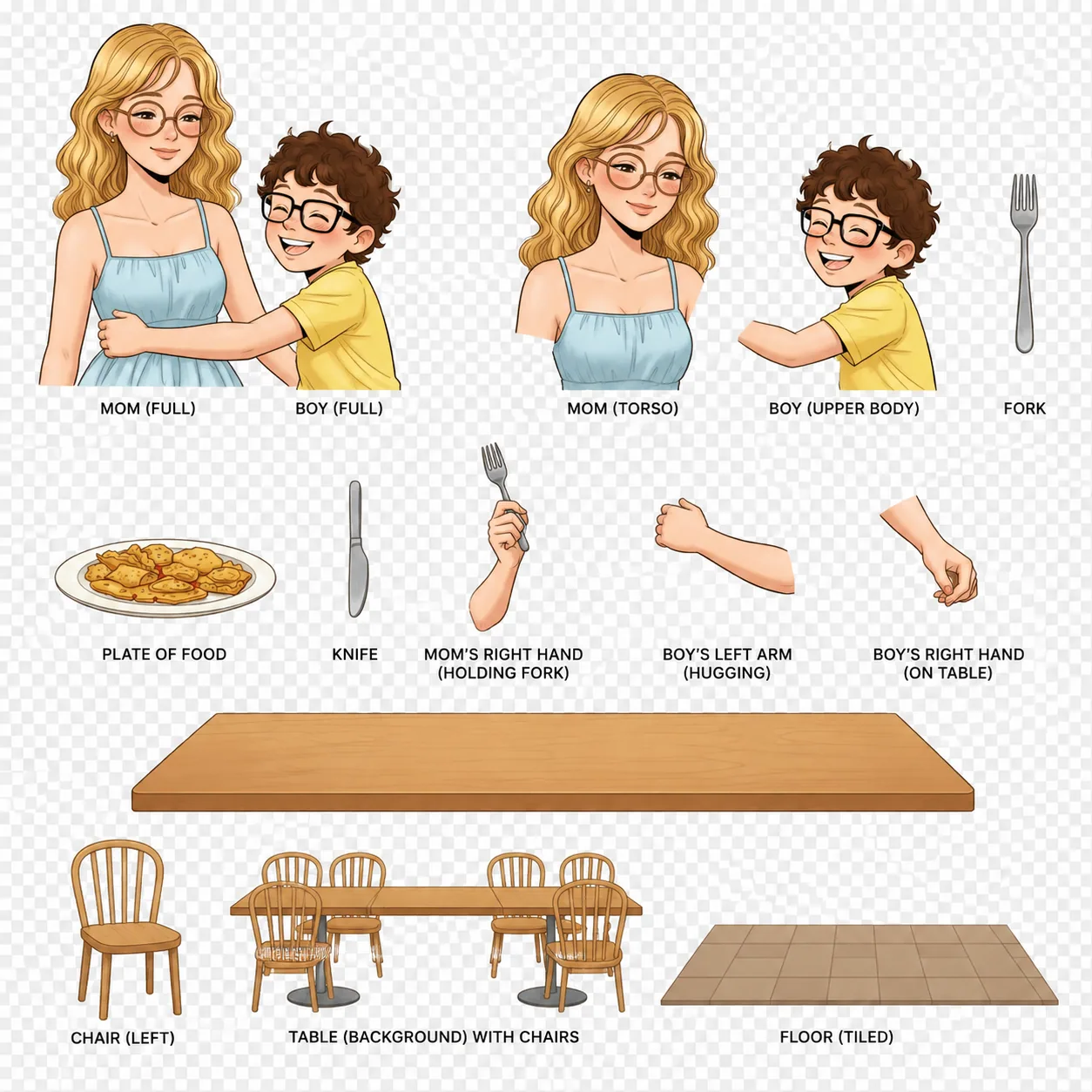
Real examples of flat artwork separated into clean, editable layers by AI Layer Split.
Character & Background Split
Cleanly separate the main character from a detailed background in one click.


Full Element Breakdown
Decompose a busy scene into every distinct object as its own transparent layer.


Character Isolation
Extract just the subject with crisp edges and a fully transparent background.


How to Use AI Layer Split
Turn any flattened image into separated, editable layers with AI Layer Split in just a few steps.
Upload Your Image
Drag and drop the flat illustration or artwork you want to split with AI Layer Split.
Choose a Split Mode
Pick automatic full decomposition, character/background separation, or character isolation.
Let AI Separate the Layers
The AI detects characters, backgrounds, and objects and isolates each as its own layer.
Download Your Layers
Export the separated layers and drop them straight into Photoshop, Procreate, or your game engine.
Why Creators Love AI Layer Split
AI Layer Split makes professional layer separation fast, accurate, and accessible to everyone.
Smart Layer Detection
AI automatically identifies characters, backgrounds, and objects with precise edges.
Clean Cutouts
Get sharp, transparent cutouts without tedious manual masking or selection.
Seconds, Not Hours
Separate complex artwork in seconds instead of painstaking manual work in Photoshop.
Multiple Split Modes
Choose full breakdown, character/background split, or single-subject isolation.
High-Quality Output
Preserve the original colors, linework, and detail across every separated layer.
Ready for Any Pipeline
Layers drop straight into editing, animation, and game art workflows.
Split Your First Image with AI Layer Split
Upload an illustration and get clean, editable layers in seconds — free to try.
Why Choose AI Layer Split
Built for illustrators, animators, and game artists who need editable layers fast.
Accurate Separation
AI segmentation isolates each element cleanly, even in detailed scenes.
Lightning Fast
Skip hours of manual masking and get usable layers in seconds.
Detail Preserved
Original colors, linework, and proportions stay intact on every layer.
Loved by Artists Using AI Layer Split
See how creators speed up their workflow with AI Layer Split.
"AI Layer Split saves me hours — I drop in a finished piece and get clean editable layers instantly."

Mia Chen
Freelance Illustrator
"Separating sprites and backgrounds used to be tedious. AI Layer Split turns it into a one-click job."

Daniel Ortega
Game Artist
"The character isolation is impressively clean. AI Layer Split fits right into my animation pipeline."

Aiko Tanaka
2D Animator
"I use AI Layer Split to break flat artwork into layers for motion graphics. It just works."

Sarah Müller
Motion Designer
"Separating panels and characters is effortless now. AI Layer Split keeps every line clean and editable."

Liam Walsh
Comic Artist
"AI Layer Split lets me reuse elements across pieces instantly. It's become part of my daily workflow."

Priya Sharma
Concept Artist
Frequently Asked Questions
Everything you need to know about AI Layer Split.
01What is AI Layer Split?
AI Layer Split is an AI tool that separates a flat image into editable layers — like characters, backgrounds, and objects — so you can edit each element independently.
02What image formats can I upload?
You can upload common formats such as PNG, JPG, and WebP. For best results use a clear, high-resolution image.
03Do the separated layers have transparent backgrounds?
Yes. Isolated elements are returned on transparent backgrounds so you can recompose them freely.
04Is AI Layer Split good for game and animation assets?
Absolutely. AI Layer Split is built to feed editing, animation, and game art pipelines with clean, reusable layers.
05Is AI Layer Split free to use?
You can try AI Layer Split for free. Some advanced split modes and higher resolutions require a membership.
06Will the original quality be preserved?
Yes. The AI keeps the original colors, linework, and proportions intact across every separated layer.
Still have questions? Email us at hello@ailineart.com
Related AI Tools
Explore more AI generator tools powered by AI Line Art

Nano Banana 2
Nano Banana 2 - Lightning-fast 4K AI image generation. Ultra-wide aspect ratios, character consistency, crisp text rendering, and Google Search for accurate references.

AI Book Cover Generator
Create genre-ready AI book covers with clear title and author typography for Kindle, KDP, Wattpad, and indie publishing.
AI Line Art Colorization
Turn black & white line art into stunning colored artwork with AI. Anime, manga, characters, illustrations — free, instant, no skills needed.

Image to Line Art
Turn any image into line art effortlessly. AI-powered conversion with multiple styles, fast results, and low cost.

Minimalist Line Art
Turn any image into elegant minimalist line art using AI. Fast, free, and easy.

3D Line Art
Convert images into stunning 3D line art effortlessly with our AI generator. Quick processing, and diverse artistic styles available for free.

AI Sketch Simplification
Refine messy sketches into polished line art with AI. Instantly remove clutter, smooth lines, and create professional results in seconds.

AI Coloring Page Generator
Transform any image into printable coloring pages with AI. Create custom coloring books instantly with multiple styles - from simple outlines to detailed designs. Fast and easy to use.

AI Comic Strip Generator
Turn any story idea into a clean multi-panel comic strip with AI. Manga, webtoon, and classic comic styles in seconds — free, fast, no sign-up.

AI Pixel Art Generator
Create crisp AI pixel art online. Generate 8-bit sprites, 16-bit game assets, icons, avatars, and isometric scenes in seconds.

AI OC Maker
Instantly create unique OCs with AI character generator. Features multiple art styles, reference image upload, and lightning-fast creation. No skills required.
AI Layer Split
Split flat illustrations into clean, editable layers with AI — separate characters, backgrounds, and objects in seconds for editing and game art.