Image to Sketch Gallery
See how our AI transforms ordinary photos into artistic sketches
Portrait Sketch Transformation
Convert portrait photos into realistic pencil sketches with natural shading and artistic texture. Perfect for creating memorable artwork from family photos or professional headshots.


Landscape & Architecture Sketches
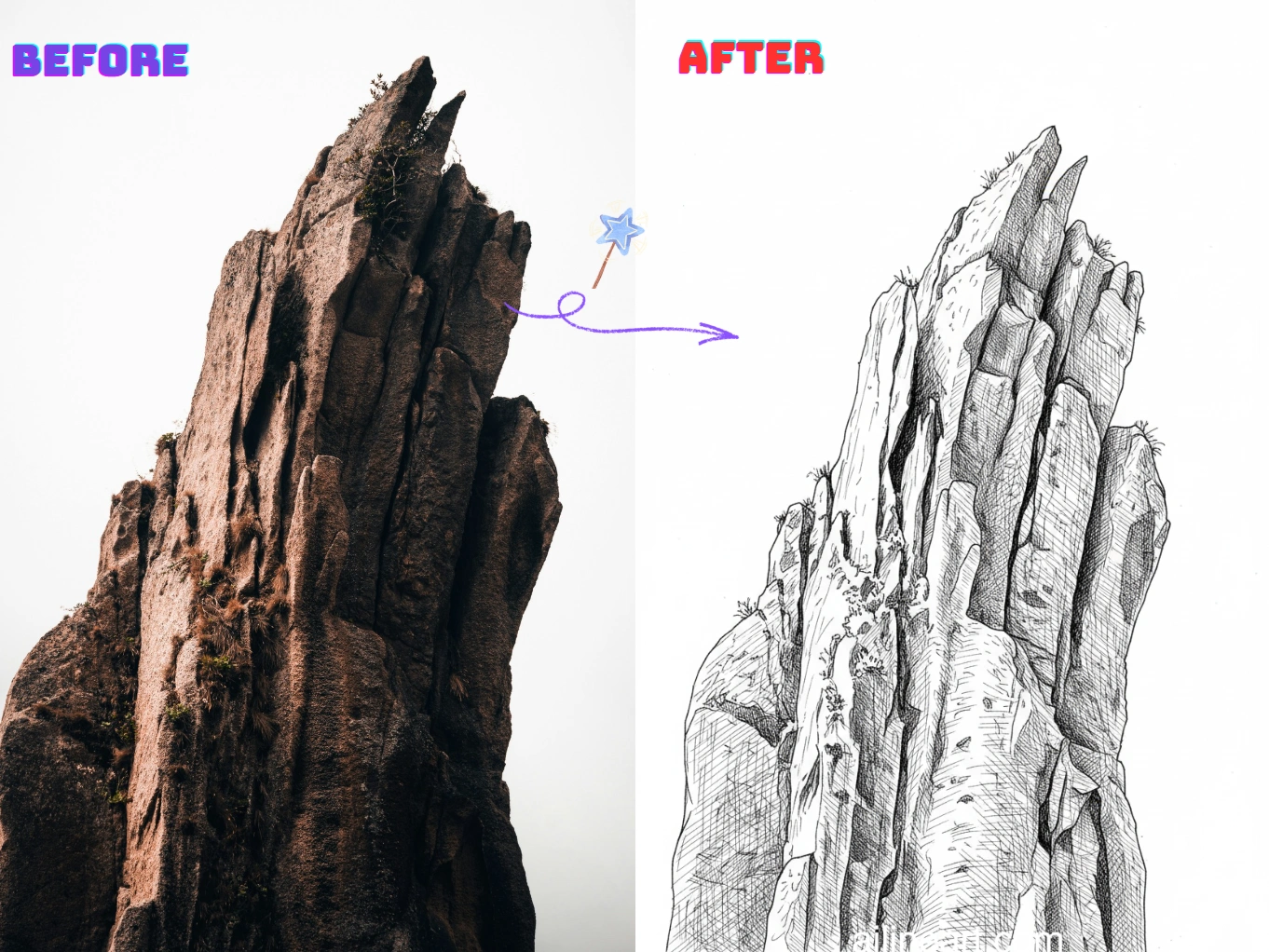
Transform scenic photos and buildings into detailed architectural sketches. Our AI captures depth, perspective, and fine details to create professional-looking drawings.


Pet & Animal Sketches
Turn your favorite pet photos into charming sketch art. The AI preserves fur texture, facial expressions, and personality in beautiful hand-drawn style.


How to Use Image to Sketch Generator
Follow these simple steps to generate line art with our Image to Sketch Generator

Upload Your Photo
Select the photo you want to modify using Image to Sketch.
Enter Prompt
Describe what you want to change in the image, Optional.
Click the Generator Button
Click the generator button to start the AI generator and begin the image generation process.
Download Image
Download your high-quality line art image, ready to use in your project.
Image to Sketch Features
Advanced AI technology that creates realistic sketch art from any photo
Multiple Sketch Styles
Choose from pencil sketch, charcoal drawing, pen sketch, and more. Each style is optimized to capture different artistic effects and moods.
Intelligent Shading
Our AI analyzes light and shadow in your photo to create realistic shading, cross-hatching, and tonal variations just like hand-drawn sketches.
Detail Preservation
Advanced edge detection ensures important details like facial features, textures, and fine lines are preserved while creating an authentic sketch appearance.
Upload Any Photo
Simply upload your image—portraits, landscapes, pets, objects, or any photo—and transform it into sketch art in seconds with one click.
High-Quality Output
Download your sketches in high resolution suitable for printing, framing, social media, or professional use. Crystal clear results every time.
Browser-Based Tool
No software installation needed. Create sketch art directly in your web browser on any device—desktop, tablet, or smartphone.
Start Creating Image to Sketch Now
Join thousands of artists and creators transforming photos into sketches
Why Choose Image to Sketch?
The most advanced AI tool for converting photos to sketches
Artistic AI Algorithm
Our proprietary AI is trained on thousands of real artist sketches, understanding shading techniques, line weight variations, and artistic composition to create authentic-looking drawings.
Lightning-Fast Processing
What takes professional artists hours or even days to sketch manually, our AI accomplishes in seconds while maintaining artistic quality and detail.
Professional Results
Every sketch is generated with attention to artistic principles—proper shading, natural line work, and balanced composition that looks hand-drawn by a skilled artist.
Loved By Image to Sketch Users
Hear from creators and professionals who use Image to Sketch daily.
"The AI line art colorization is incredible! It understands exactly where to apply colors and creates beautiful gradients. What used to take me hours now takes seconds. A must-have tool for any artist!"

Sarah Chen
Digital Artist
"As a manga artist, coloring pages was always the most time-consuming part. This Image to Sketch handles line art colorization perfectly - the colors stay within lines and the shading looks natural."

Mike Roberts
Manga Creator
"I was skeptical about AI colorization at first, but Image to Sketch blew me away. The results look hand-painted, not like typical AI output. My clients love the vibrant colors!"

Emily Wang
Illustrator
"This tool has revolutionized my comic coloring workflow. The AI understands line art structure and applies colors intelligently. I can now produce more content without sacrificing quality."

David Kim
Comic Book Artist
"Perfect for quick concept iterations! I sketch in black and white, then use Image to Sketch to explore different color schemes instantly. The AI line art colorization saves me so much time."

Lisa Thompson
Concept Artist
"As a student, I don't have budget for expensive software. Image to Sketch gives me professional-quality line art colorization for free. The results are amazing and help my portfolio stand out!"

Alex Martinez
Animation Student
Frequently Asked Questions
Everything you need to know about Image to Sketch
01What is Image to Sketch?
Image to Sketch is an AI-powered tool that converts your uploaded photos into realistic sketch artwork. It analyzes your image and applies artistic sketch effects including shading, line work, and texture to create drawings that look hand-made.
02How do I convert my photo to a sketch?
Simply upload your photo using the tool, choose your preferred sketch style (pencil, charcoal, pen, etc.), and click generate. Image to Sketch will process your image and create a sketch version in seconds.
03What types of photos work best?
Any photo works! Portraits, landscapes, pets, architecture, objects—all convert beautifully. For best results, use clear photos with good lighting and resolution. Photos with strong contrast produce more dramatic sketches.
04What sketch styles are available?
Image to Sketch offers multiple styles including pencil sketch, charcoal drawing, pen and ink, conte crayon, and more. Each style creates a different artistic effect and mood.
05Can I use the sketches commercially?
Yes! Sketches you create with Image to Sketch can be used for commercial purposes including client work, products, marketing materials, and merchandise according to our terms of service.
06What file formats are supported?
Upload: JPG, PNG, WEBP, and most common image formats. Download: High-resolution PNG and WEBP files perfect for printing or digital use.
07How do I get the best sketch results?
Use high-quality photos with clear subjects and good lighting. For portraits, front-facing photos with neutral backgrounds work great. Experiment with different sketch styles to find the perfect artistic effect for your image.
08Is there a file size limit?
Image to Sketch accepts images up to 10MB. For best performance and quality, we recommend images between 1-5MB with at least 1000px on the longest side.
09How is my photo data protected?
Your uploaded photos are processed securely and privately. We don't share or use your images without permission. Your creative work and personal photos remain yours.
10Can I adjust the sketch intensity?
While Image to Sketch automatically optimizes sketch intensity for each image, you can regenerate with different style options to achieve lighter or heavier sketch effects. Each style has its own characteristic intensity and artistic approach.
Still have questions? Email us at hello@ailineart.com
Related AI Tools
Explore more AI generator tools powered by AI Line Art

Nano Banana 2
Nano Banana 2 - Lightning-fast 4K AI image generation. Ultra-wide aspect ratios, character consistency, crisp text rendering, and Google Search for accurate references.

AI Book Cover Generator
Create genre-ready AI book covers with clear title and author typography for Kindle, KDP, Wattpad, and indie publishing.

AI Line Art Colorization
Turn black & white line art into stunning colored artwork with AI. Anime, manga, characters, illustrations — free, instant, no skills needed.

Image to Line Art
Turn any image into line art effortlessly. AI-powered conversion with multiple styles, fast results, and low cost.

Minimalist Line Art
Turn any image into elegant minimalist line art using AI. Fast, free, and easy.

3D Line Art
Convert images into stunning 3D line art effortlessly with our AI generator. Quick processing, and diverse artistic styles available for free.

AI Sketch Simplification
Refine messy sketches into polished line art with AI. Instantly remove clutter, smooth lines, and create professional results in seconds.

AI Coloring Page Generator
Transform any image into printable coloring pages with AI. Create custom coloring books instantly with multiple styles - from simple outlines to detailed designs. Fast and easy to use.

AI Comic Strip Generator
Turn any story idea into a clean multi-panel comic strip with AI. Manga, webtoon, and classic comic styles in seconds — free, fast, no sign-up.

AI Pixel Art Generator
Create crisp AI pixel art online. Generate 8-bit sprites, 16-bit game assets, icons, avatars, and isometric scenes in seconds.

AI OC Maker
Instantly create unique OCs with AI character generator. Features multiple art styles, reference image upload, and lightning-fast creation. No skills required.

AI Layer Split
Split flat illustrations into clean, editable layers with AI — separate characters, backgrounds, and objects in seconds for editing and game art.