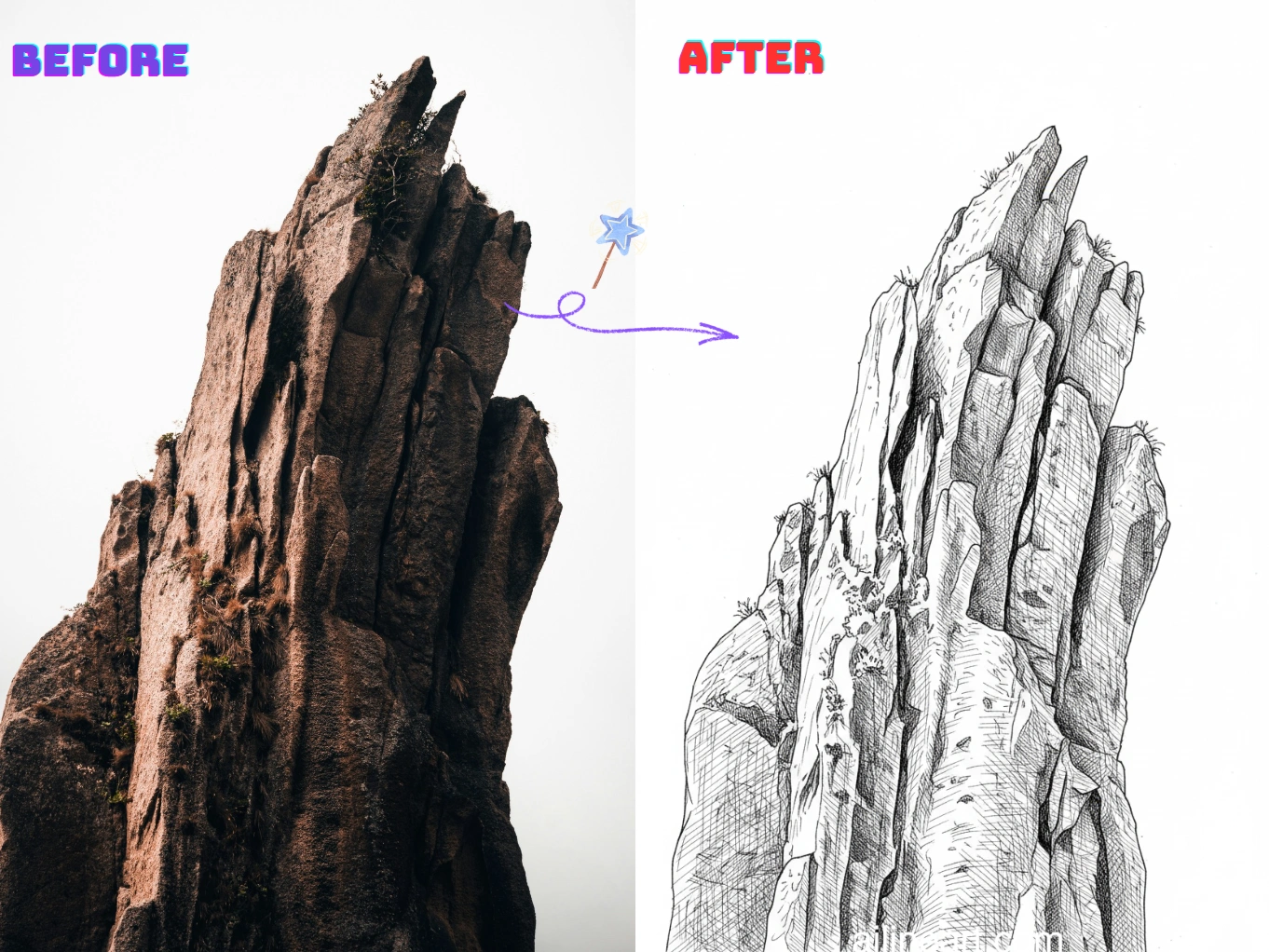
Casos de uso do Imagem para Line Art
Transforme fotos em line art limpa e pronta para impressão em segundos.
De retrato a desenho de linhas
Converta selfies e retratos em line art suave, com traços faciais nítidos e ruído mínimo — perfeita para presentes, avatares e imagens de perfil.


Contornos de produtos e objetos
Crie linhas de contorno definidas a partir de fotos de produtos e objetos para manuais, mockups, adesivos e rascunhos de design — limpas, consistentes e fáceis de editar.


Páginas para colorir e impressos DIY
Transforme pets, paisagens e cenas do cotidiano em contornos imprimíveis para páginas de colorir, artesanato e materiais escolares — prontos para baixar e compartilhar.


Como usar o Gerador Imagem para Line Art
Siga estes passos simples para gerar arte linear com nosso Gerador Imagem para Line Art

Sube tu imagen
Selecciona la imagen que deseas modificar con Imagem para Line Art.
Introduce una indicación (opcional)
Describe lo que deseas cambiar en la imagen. Opcional.
Clicar no Botão do Gerador
Clique no botão do gerador para iniciar o gerador de IA e criar sua arte linear.
Descarga la imagen
Baixe sua imagem de line art em alta qualidade, pronta para usar no seu projeto.
Recursos do Imagem para Line Art
Crie line art limpa e de alta qualidade a partir de qualquer foto com o Imagem para Line Art.
Detecção de bordas limpa
Extraia automaticamente contornos nítidos das fotos, reduzindo a bagunça e o ruído de fundo para um verdadeiro visual de line art.
Estilo de linha ajustável
Controle a espessura da linha, o nível de detalhe e o contraste para combinar com seu estilo preferido de esboço, contorno ou página para colorir.
Simplificação de fundo
Destaque o assunto simplificando cenas cheias em contornos claros, fáceis de imprimir, copiar ou editar.
Exportação em alta resolução
Baixe line art nítidas em alta resolução, adequadas para impressão, adesivos, artesanato e design digital.
Processamento rápido
Gere resultados em segundos com um pipeline otimizado — ótimo para produção em lote e iterações rápidas.
Sem instalação
Use direto no navegador em qualquer dispositivo — sem downloads, sem configuração, basta enviar e gerar.
Comece a usar o Imagem para Line Art agora
Junte-se a milhares de criadores que transformam imagens em line art com o Imagem para Line Art
Por que escolher nosso gerador de Imagem para Line Art?
Por que usar nosso gerador de Imagem para Line Art para transformar imagens em line art limpa?
Extração precisa de contornos
Nosso gerador de line art com IA detecta as bordas do assunto e os detalhes principais para produzir contornos nítidos e consistentes, reduzindo texturas e ruídos indesejados.
Foto para line art com um clique
Envie uma foto e nosso gerador entrega line art limpa em segundos — sem decalque, sem limpeza manual e sem configurações complicadas.
Resultados prontos para impressão
Produza desenhos de alto contraste fáceis de imprimir, colorir, copiar e editar para artesanato, material escolar e projetos de design.
Amado por los usuarios de Imagem para Line Art
Opiniones de creadores y profesionales que usan Imagem para Line Art diariamente.
"¡La colorización de line art con IA es increíble! Entiende perfectamente dónde aplicar color y genera hermosos degradados. Lo que antes tomaba horas, ahora toma segundos."

Sarah Chen
Artista digital
"Como artista de manga, colorear siempre era la parte más lenta. Esta herramienta maneja la colorización perfectamente: los colores no se salen de las líneas y las sombras se ven naturales."

Mike Roberts
Creador de manga
"No confiaba mucho en la colorización con IA al principio, pero Imagem para Line Art me sorprendió. ¡Los resultados parecen pintados a mano y mis clientes adoran los colores vibrantes!"

Emily Wang
Ilustradora
"Esta herramienta ha revolucionado mi flujo de trabajo. La IA entiende la estructura de la línea y aplica color inteligentemente, permitiéndome producir más sin perder calidad."

David Kim
Ilustrador de cómics
"¡Perfecto para iteración rápida! Hago bocetos en blanco y negro y uso Imagem para Line Art para probar diferentes esquemas de color al instante."

Lisa Thompson
Artista conceptual
"Como estudiante no puedo pagar software caro. Imagem para Line Art me da resultados profesionales gratis. ¡Perfecto para mi portafolio!"

Alex Martinez
Estudiante de animación
Perguntas frequentes (QA)
Explore perguntas e respostas comuns sobre o Imagem para Line Art.
01O que é o Imagem para Line Art?
O Imagem para Line Art é uma ferramenta com IA que converte fotos em desenhos de linhas limpos. Ele extrai contornos nítidos e simplifica os detalhes para um verdadeiro visual de line art.
02Como converter uma imagem em line art?
Envie sua imagem (foto ou desenho) e o Imagem para Line Art gerará automaticamente a versão em line art. Se disponível, ajuste configurações como nível de detalhe ou força da linha e baixe o resultado.
03Como funciona a conversão de imagem para line art?
Nossa IA analisa bordas, contraste e estruturas principais da imagem e as converte em contornos simplificados. O objetivo é manter os detalhes importantes e remover texturas e ruídos desnecessários.
04Preciso saber desenhar para usar o Imagem para Line Art?
Não. O Imagem para Line Art foi feito para iniciantes e profissionais — basta enviar uma imagem e obter um desenho de linhas limpo, sem decalque manual.
05Posso usar a line art gerada comercialmente?
Sim, a line art gerada com o Imagem para Line Art pode ser usada em projetos comerciais conforme nossos termos de serviço. Certifique-se de ter os direitos sobre as imagens enviadas.
06Quais imagens funcionam melhor?
Imagens com assunto claro e bom contraste funcionam melhor — retratos, produtos, pets e cenas simples. Fundos muito cheios ou fotos com pouca luz podem gerar linhas extras.
07Posso controlar o nível de detalhe da line art?
Sim. Normalmente você pode ajustar o nível de detalhe, a espessura/força da linha e o contraste para criar desde contornos mínimos até esboços mais detalhados.
08Quais formatos de imagem são suportados?
O Imagem para Line Art suporta PNG, JPG e WEBP. Para melhores resultados, envie uma imagem nítida e de alta resolução.
09Como obter resultados de line art mais limpos?
Use imagens com boa iluminação e contraste, evite fundos muito complexos e tente aumentar o contraste ou reduzir os detalhes. Se necessário, gere novamente com outras configurações para um contorno mais limpo.
10Minhas imagens enviadas são privadas?
Sim, os envios e resultados gerados são tratados com segurança. Respeitamos sua privacidade e não compartilhamos suas imagens sem permissão.
¿Aún tienes preguntas? Escríbenos a hello@ailineart.com
Ferramentas de IA relacionadas
Explore mais ferramentas de gerador de IA do AI Line Art

Nano Banana 2
Nano Banana 2 - Geração de imagens com IA em 4K na velocidade da luz. Proporções ultra-amplas, consistência de personagens, renderização de texto nítida e Google Search para referências precisas.

Gerador de capas com IA
Crie capas com IA e tipografia clara para Kindle, KDP, Wattpad e publicação independente.

Colorización de Line Art con IA
Coloriza tu line art con IA — gratis, rápido y fácil. Compatible con subida de imágenes y múltiples estilos.

Imagem para Line Art
Transforme qualquer imagem em line art com facilidade. Conversão com IA em estilos limpos e prontos para uso.

Arte Linear Minimalista
Transforme qualquer imagem em elegante arte linear minimalista usando IA. Rápido, gratuito e fácil.

Arte Linear 3D
Converta imagens em arte linear 3D impressionante sem esforço com nosso gerador de IA. Processamento rápido, interface amigável e diversos estilos artísticos disponíveis gratuitamente.

Simplificação de Esboços com IA
Refine esboços bagunçados em arte linear polida com IA. Remova instantaneamente a desordem, suavize as linhas e crie resultados profissionais em segundos.

Gerador de Páginas para Colorir IA
Transforme qualquer imagem em páginas para colorir imprimíveis com IA. Crie livros de colorir personalizados instantaneamente com vários estilos - de contornos simples a designs detalhados. Rápido e fácil de usar.

Gerador de Quadrinhos com IA
Transforme qualquer ideia em uma tira de quadrinhos de vários quadros com IA. Estilos mangá, webtoon e clássico em segundos — grátis, sem cadastro.

Gerador de pixel art com IA
Crie pixel art nítida online. Gere sprites 8-bit, assets 16-bit, ícones, avatares e cenas isométricas em segundos.

Gerador de OC com IA
Crie instantaneamente OCs únicos com o gerador de personagens com IA. Múltiplos estilos artísticos, upload de imagens de referência e criação ultrarrápida. Nenhuma habilidade necessária.

Separação de camadas com IA
Divida ilustrações planas em camadas limpas e editáveis com IA — separe personagens, fundos e objetos em segundos.