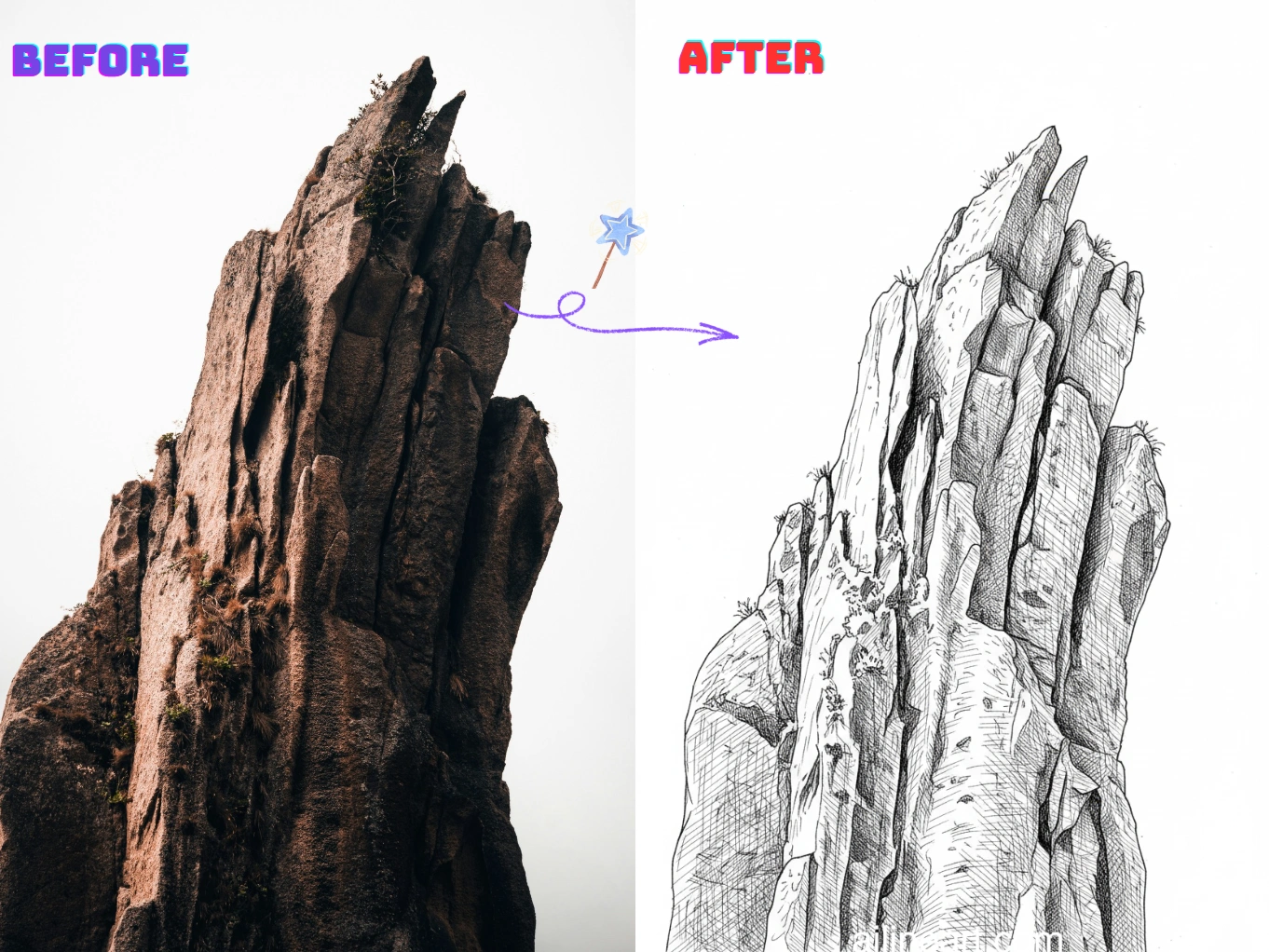
กรณีการใช้งาน รูปภาพเป็นงานเส้น
เปลี่ยนภาพถ่ายเป็นงานเส้นที่สะอาดและพร้อมพิมพ์ในไม่กี่วินาที
ภาพพอร์ตเทรตเป็นภาพเส้น
แปลงเซลฟี่และภาพพอร์ตเทรตเป็นงานเส้นที่นุ่มนวล ใบหน้าชัดเจนและมีสัญญาณรบกวนน้อย เหมาะสำหรับของขวัญ อวตาร และภาพโปรไฟล์


เส้นขอบสินค้าและวัตถุ
สร้างเส้นขอบที่คมชัดจากภาพสินค้าและวัตถุสำหรับคู่มือ ม็อกอัป สติกเกอร์ และแบบร่างการออกแบบ สะอาด สม่ำเสมอ และแก้ไขง่าย


หน้าระบายสีและงานพิมพ์ DIY
เปลี่ยนสัตว์เลี้ยง ทิวทัศน์ และฉากชีวิตประจำวันเป็นเส้นขอบสำหรับพิมพ์ ใช้ทำหน้าระบายสี งานฝีมือ และสื่อการสอน พร้อมดาวน์โหลดและแชร์


วิธีใช้ตัวสร้าง รูปภาพเป็นงานเส้น
ทำตามขั้นตอนง่าย ๆ เหล่านี้เพื่อสร้างศิลปะเส้นด้วยตัวสร้าง รูปภาพเป็นงานเส้น ของเรา

อัปโหลดรูปภาพ
เลือกรูปภาพที่คุณต้องการให้ รูปภาพเป็นงานเส้น ช่วยปรับแต่ง
ใส่พรอมต์ (ไม่บังคับ)
อธิบายสิ่งที่ต้องการเปลี่ยนแปลงในภาพ ตัวเลือกเสริม
คลิกปุ่มตัวสร้าง
คลิกปุ่มตัวสร้างเพื่อเริ่ม AI Generator และสร้างศิลปะเส้นของคุณ
ดาวน์โหลดภาพ
ดาวน์โหลดภาพลายเส้นคุณภาพสูงที่พร้อมใช้งานในโปรเจกต์ของคุณ
ฟีเจอร์ของ รูปภาพเป็นงานเส้น
สร้างงานเส้นที่สะอาดและมีคุณภาพสูงจากภาพถ่ายใดก็ได้ด้วย รูปภาพเป็นงานเส้น
ตรวจจับขอบแบบสะอาด
ดึงเส้นขอบที่คมชัดจากภาพถ่ายโดยอัตโนมัติ พร้อมลดความรกและสัญญาณรบกวนของพื้นหลังเพื่อลุคงานเส้นแท้
ปรับสไตล์เส้นได้
ควบคุมความหนาของเส้น ระดับรายละเอียด และคอนทราสต์ให้ตรงกับสไตล์สเก็ตช์ เส้นขอบ หรือหน้าระบายสีที่คุณต้องการ
ทำพื้นหลังให้เรียบง่าย
ทำให้วัตถุเด่นขึ้นด้วยการทำฉากที่รกให้เป็นเส้นขอบที่ชัดเจน พิมพ์ ลอก หรือแก้ไขง่าย
ส่งออกความละเอียดสูง
ดาวน์โหลดงานเส้นคมชัดความละเอียดสูง เหมาะสำหรับการพิมพ์ สติกเกอร์ งานฝีมือ และดีไซน์ดิจิทัล
ประมวลผลรวดเร็ว
สร้างผลลัพธ์ในไม่กี่วินาทีด้วยไปป์ไลน์ที่ปรับแต่งมาแล้ว เหมาะสำหรับงานจำนวนมากและการลองซ้ำเร็ว ๆ
ไม่ต้องติดตั้ง
ใช้งานผ่านเบราว์เซอร์ได้ทุกอุปกรณ์ ไม่ต้องดาวน์โหลด ไม่ต้องตั้งค่า แค่อัปโหลดแล้วสร้าง
เริ่มใช้ รูปภาพเป็นงานเส้น เลย
เข้าร่วมกับครีเอเตอร์นับพันที่ใช้ รูปภาพเป็นงานเส้น แปลงรูปภาพเป็นงานเส้น
ทำไมต้องเลือกเจนเนอเรเตอร์ รูปภาพเป็นงานเส้น ของเรา?
ทำไมต้องใช้เจนเนอเรเตอร์ รูปภาพเป็นงานเส้น ของเราในการแปลงรูปภาพเป็นงานเส้นที่สะอาด?
ดึงเส้นขอบได้แม่นยำ
เจนเนอเรเตอร์งานเส้น AI ของเราตรวจจับขอบของวัตถุและรายละเอียดสำคัญ เพื่อสร้างเส้นขอบที่คมชัดและสม่ำเสมอ พร้อมลดพื้นผิวและสัญญาณรบกวนที่ไม่ต้องการ
จากภาพถ่ายสู่งานเส้นในคลิกเดียว
แค่อัปโหลดภาพถ่าย เจนเนอเรเตอร์จะสร้างงานเส้นที่สะอาดในไม่กี่วินาที ไม่ต้องลอก ไม่ต้องเก็บรายละเอียดเอง ไม่ต้องตั้งค่ายุ่งยาก
ผลงานพร้อมพิมพ์
สร้างภาพเส้นคอนทราสต์สูงที่พิมพ์ ระบายสี ลอก และแก้ไขง่าย สำหรับงานฝีมือ สื่อการเรียน และโปรเจกต์ดีไซน์
เสียงตอบรับจากผู้ใช้ รูปภาพเป็นงานเส้น
อ่านความคิดเห็นจากผู้สร้างและมืออาชีพที่ใช้ รูปภาพเป็นงานเส้น ทุกวัน
"ระบบระบายสีด้วย AI น่าทึ่งมาก! เข้าใจตำแหน่งที่ควรลงสีได้อย่างแม่นยำ ไล่เฉดสีก็สวยงาม งานที่เคยใช้เวลานาน ตอนนี้ใช้เวลาเพียงไม่กี่วินาที"

Sarah Chen
นักวาดดิจิทัล
"การลงสีในมังงะเป็นงานที่กินเวลามากที่สุด แต่ รูปภาพเป็นงานเส้น ทำได้สมบูรณ์แบบ สีไม่ล้นออกนอกเส้นและแสงเงาดูเป็นธรรมชาติ"

Mike Roberts
นักวาดมังงะ
"ตอนแรกไม่เชื่อใน AI ระบายสี แต่ รูปภาพเป็นงานเส้น ทำให้ประทับใจมาก ผลลัพธ์ดูเหมือนวาดด้วยมือจริงๆ ลูกค้าก็ชอบมาก"

Emily Wang
นักวาดภาพประกอบ
"เครื่องมือนี้ช่วยปรับปรุงขั้นตอนการทำงานของผมอย่างมาก AI เข้าใจโครงสร้างเส้นลายและลงสีได้อย่างชาญฉลาด"

David Kim
นักวาดคอมิก
"เหมาะสุดๆ สำหรับการลองโทนสีอย่างรวดเร็ว! ฉันวาดลายเส้นขาวดำแล้วใช้ รูปภาพเป็นงานเส้น เพื่อทดสอบโทนสีต่างๆ ได้ทันที"

Lisa Thompson
คอนเซ็ปต์อาร์ติสต์
"ในฐานะนักศึกษา ฉันไม่สามารถซื้อโปรแกรมราคาแพงได้ รูปภาพเป็นงานเส้น ช่วยให้ฉันได้ผลงานคุณภาพระดับมืออาชีพฟรี!"

Alex Martinez
นักศึกษาสายแอนิเมชัน
คำถามที่พบบ่อย (QA)
ดูคำถามและคำตอบที่พบบ่อยเกี่ยวกับ รูปภาพเป็นงานเส้น
01รูปภาพเป็นงานเส้น คืออะไร?
รูปภาพเป็นงานเส้น เป็นเครื่องมือ AI ที่แปลงภาพถ่ายเป็นภาพเส้นที่สะอาด ดึงเส้นขอบที่คมชัดและทำให้รายละเอียดเรียบง่ายเพื่อลุคงานเส้นแท้
02แปลงรูปภาพเป็นงานเส้นอย่างไร?
อัปโหลดรูปภาพของคุณ (ภาพถ่ายหรืองานศิลปะ) แล้ว รูปภาพเป็นงานเส้น จะสร้างเวอร์ชันงานเส้นให้อัตโนมัติ ปรับการตั้งค่าอย่างระดับรายละเอียดหรือความเข้มของเส้นหากมี แล้วดาวน์โหลดผลลัพธ์
03การแปลงรูปภาพเป็นงานเส้นทำงานอย่างไร?
AI ของเราวิเคราะห์ขอบ คอนทราสต์ และโครงสร้างสำคัญในภาพ แล้วแปลงเป็นเส้นขอบที่เรียบง่าย เป้าหมายคือคงรายละเอียดสำคัญไว้พร้อมตัดพื้นผิวและสัญญาณรบกวนที่ไม่จำเป็นออก
04ต้องมีทักษะการวาดเพื่อใช้ รูปภาพเป็นงานเส้น ไหม?
ไม่ต้อง รูปภาพเป็นงานเส้น ออกแบบมาสำหรับทั้งมือใหม่และมืออาชีพ แค่อัปโหลดภาพก็ได้งานเส้นที่สะอาดโดยไม่ต้องลอกเอง
05ใช้งานเส้นที่สร้างได้เชิงพาณิชย์หรือไม่?
ได้ งานเส้นที่สร้างด้วย รูปภาพเป็นงานเส้น ใช้ในโปรเจกต์เชิงพาณิชย์ได้ตามข้อกำหนดการให้บริการของเรา โปรดตรวจสอบว่าคุณมีสิทธิ์ในภาพที่อัปโหลด
06ภาพแบบไหนให้ผลดีที่สุด?
ภาพที่วัตถุชัดเจนและคอนทราสต์ดีให้ผลดีที่สุด เช่น พอร์ตเทรต สินค้า สัตว์เลี้ยง และฉากง่าย ๆ พื้นหลังที่รกมากหรือภาพในที่แสงน้อยอาจได้เส้นเกินมา
07ปรับระดับรายละเอียดของงานเส้นได้ไหม?
ได้ โดยทั่วไปคุณปรับระดับรายละเอียด ความหนา/ความเข้มของเส้น และคอนทราสต์ได้ ตั้งแต่เส้นขอบน้อย ๆ จนถึงสเก็ตช์ที่ละเอียด
08รองรับรูปแบบภาพอะไรบ้าง?
รูปภาพเป็นงานเส้น รองรับรูปแบบ PNG, JPG และ WEBP เพื่อผลลัพธ์ที่ดีที่สุด ให้อัปโหลดภาพที่ชัดและความละเอียดสูง
09จะได้งานเส้นที่สะอาดกว่านี้ได้อย่างไร?
ใช้ภาพที่แสงและคอนทราสต์ดี หลีกเลี่ยงพื้นหลังที่ซับซ้อนเกินไป และลองเพิ่มคอนทราสต์หรือลดรายละเอียด หากจำเป็นให้สร้างใหม่ด้วยการตั้งค่าอื่นเพื่อเส้นขอบที่สะอาดขึ้น
10ภาพที่อัปโหลดเป็นส่วนตัวหรือไม่?
ใช่ การอัปโหลดและผลลัพธ์ที่สร้างถูกจัดการอย่างปลอดภัย เราเคารพความเป็นส่วนตัวของคุณและจะไม่แชร์ภาพของคุณโดยไม่ขออนุญาต
ยังมีคำถามเพิ่มเติม? ติดต่อเราได้ที่ hello@ailineart.com
เครื่องมือ AI ที่เกี่ยวข้อง
สำรวจเครื่องมือ AI Generator เพิ่มเติมจาก AI Line Art

Nano Banana 2
Nano Banana 2 - สร้างภาพ AI 4K เร็วระดับสายฟ้า รองรับอัตราส่วนจอกว้างพิเศษ ความสม่ำเสมอของตัวละคร เรนเดอร์ข้อความคมชัด และ Google Search เพื่ออ้างอิงที่แม่นยำ

เครื่องมือสร้างปกหนังสือ AI
สร้างปกหนังสือ AI พร้อมชื่อเรื่องและชื่อผู้เขียนที่อ่านง่าย สำหรับ Kindle, KDP, Wattpad และงานตีพิมพ์เอง

AI ระบายสีลายเส้น
ระบายสีลายเส้นด้วย AI — ฟรี เร็ว และง่าย รองรับการอัปโหลดรูปภาพและหลายสไตล์

รูปภาพเป็นงานเส้น
เปลี่ยนรูปภาพใด ๆ เป็นงานเส้นได้อย่างง่ายดาย ด้วย AI และสไตล์ที่สะอาดพร้อมใช้งาน

ศิลปะเส้นมินิมอล
แปลงภาพใดก็ได้ให้เป็นศิลปะเส้นมินิมอลสุดหรูด้วย AI รวดเร็ว ฟรี และใช้งานง่าย

ศิลปะเส้น 3D
แปลงภาพเป็นศิลปะเส้น 3D ที่น่าทึ่งอย่างง่ายดายด้วยเครื่องมือ AI ของเรา การประมวลผลรวดเร็ว อินเทอร์เฟซที่เป็นมิตรต่อผู้ใช้ และสไตล์ศิลปะที่หลากหลายพร้อมให้บริการฟรี

การทำให้ภาพร่างเรียบง่ายด้วย AI
ปรับแต่งภาพร่างที่รก ให้เป็นงานศิลปะเส้นที่เรียบร้อยด้วย AI ลบความยุ่งเหยิงได้ทันที ทำให้เส้นเรียบ และสร้างผลลัพธ์ระดับมืออาชีพภายในไม่กี่วินาที

เครื่องมือสร้างหน้าระบายสี AI
แปลงรูปภาพใดๆ เป็นหน้าระบายสีที่พิมพ์ได้ด้วย AI สร้างหนังสือระบายสีที่กำหนดเองทันทีด้วยหลายสไตล์ - ตั้งแต่เส้นขอบง่ายๆ ไปจนถึงการออกแบบที่ละเอียด รวดเร็วและใช้งานง่าย

เครื่องสร้างการ์ตูนช่อง AI
เปลี่ยนทุกไอเดียเป็นการ์ตูนหลายช่องด้วย AI สไตล์มังงะ เว็บตูน และคลาสสิกในไม่กี่วินาที ฟรี ไม่ต้องสมัคร

ตัวสร้างพิกเซลอาร์ต AI
สร้างพิกเซลอาร์ต AI ที่คมชัดออนไลน์ สร้างสไปรต์ 8-bit แอสเซ็ตเกม 16-bit ไอคอน อวาตาร์ และฉากไอโซเมตริกในไม่กี่วินาที

เครื่องสร้าง OC ด้วย AI
สร้าง OC ที่ไม่เหมือนใครได้ทันทีด้วยเครื่องสร้างตัวละคร AI มีหลายสไตล์ศิลปะ อัปโหลดรูปอ้างอิง และสร้างได้รวดเร็วเหมือนสายฟ้าแลบ ไม่ต้องมีทักษะ

แยกเลเยอร์ด้วย AI
แยกภาพประกอบแบบแบนเป็นเลเยอร์ที่สะอาดและแก้ไขได้ด้วย AI แยกตัวละคร พื้นหลัง และวัตถุได้ในไม่กี่วินาที เหมาะสำหรับการแก้ไข แอนิเมชัน และอาร์ตเกม