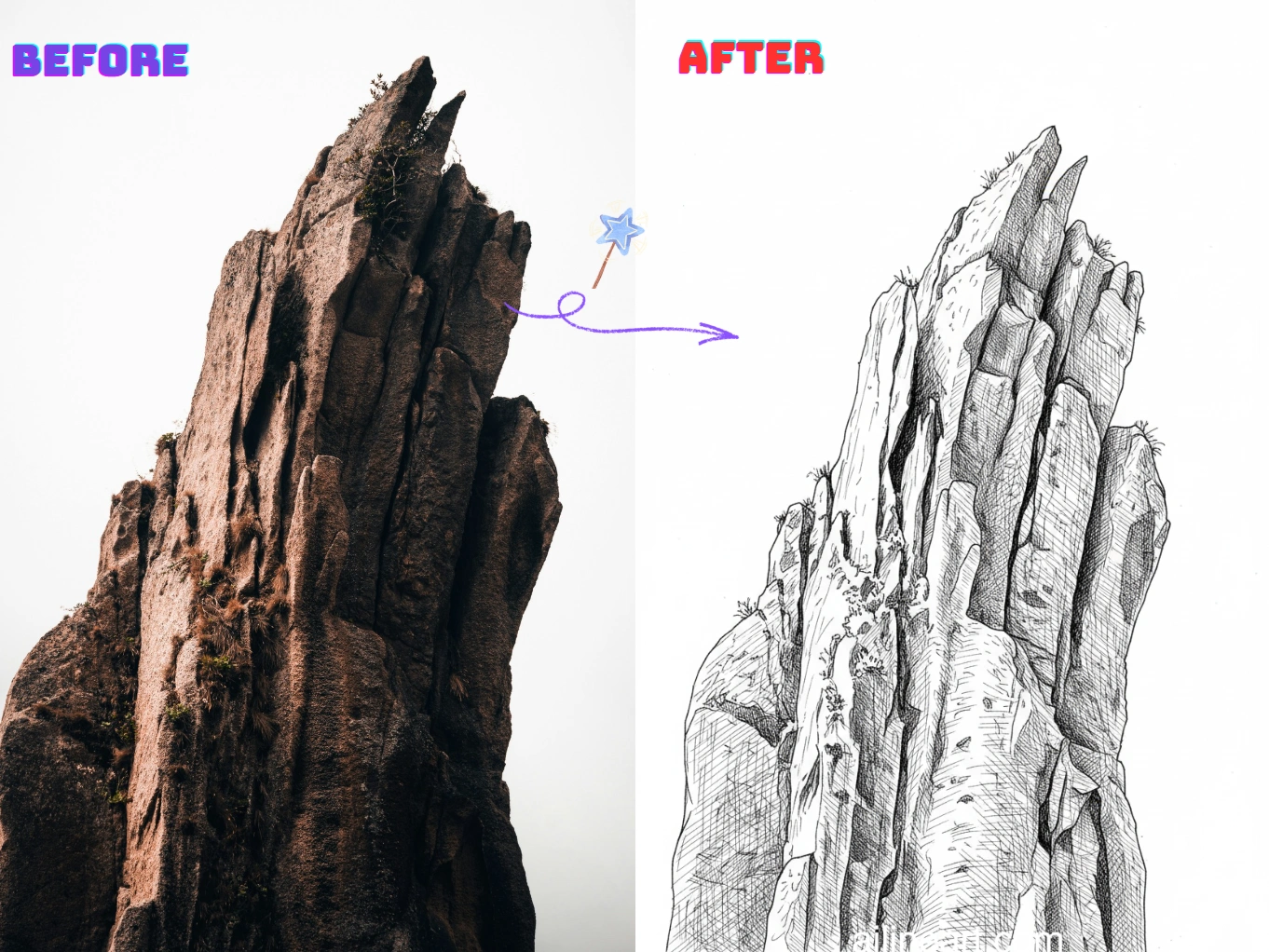
Применение Изображение в лайн-арт
Превращайте фото в чистый, пригодный для печати лайн-арт за секунды.
Портрет в линейный рисунок
Превращайте селфи и портреты в мягкий лайн-арт с чёткими чертами лица и минимумом шума — идеально для подарков, аватаров и изображений профиля.


Контуры товаров и предметов
Создавайте чёткие контурные линии из фото товаров и предметов для инструкций, мокапов, стикеров и дизайн-эскизов — чисто, последовательно и легко редактируется.


Раскраски и DIY-печатные материалы
Превращайте питомцев, пейзажи и повседневные сцены в печатные контуры для раскрасок, поделок и учебных материалов — готово к скачиванию и публикации.


Как использовать генератор Изображение в лайн-арт
Следуйте этим простым шагам, чтобы создать линейное искусство с помощью нашего генератора Изображение в лайн-арт

Загрузите изображение
Выберите изображение, которое хотите изменить с помощью Изображение в лайн-арт.
Введите промпт (необязательно)
Опишите желаемые изменения — это необязательно.
Нажмите кнопку генератора
Нажмите кнопку генератора, чтобы запустить AI-генератор и создать линейное искусство.
Скачайте результат
Скачайте высококачественное изображение в стиле line art и используйте его в своих проектах.
Возможности Изображение в лайн-арт
Создавайте чистый высококачественный лайн-арт из любого фото с помощью Изображение в лайн-арт.
Чистое определение краёв
Автоматически извлекайте чёткие контуры из фотографий, убирая лишние детали и фоновый шум для настоящего эффекта лайн-арта.
Настраиваемый стиль линий
Контролируйте толщину линий, уровень детализации и контраст, чтобы получить желаемый стиль: набросок, контур или раскраска.
Упрощение фона
Выделяйте объект, превращая перегруженные сцены в ясные контуры, которые легко печатать, обводить и редактировать.
Экспорт в высоком разрешении
Скачивайте чёткий лайн-арт в высоком разрешении — подходит для печати, стикеров, поделок и цифрового дизайна.
Быстрая обработка
Результаты за секунды благодаря оптимизированному конвейеру — отлично для массового создания и быстрого перебора вариантов.
Без установки
Работайте прямо в браузере на любом устройстве — без загрузок и настроек: загрузите изображение и генерируйте.
Начните использовать Изображение в лайн-арт прямо сейчас
Присоединяйтесь к тысячам авторов, которые превращают изображения в лайн-арт с помощью Изображение в лайн-арт
Почему выбирают наш генератор Изображение в лайн-арт?
Почему стоит использовать наш генератор Изображение в лайн-арт для превращения изображений в чистый лайн-арт?
Точное извлечение контуров
Наш ИИ-генератор лайн-арта определяет края объекта и ключевые детали, создавая чёткие и последовательные контуры, убирая лишние текстуры и шум.
Фото в лайн-арт в один клик
Загрузите фото — генератор создаст чистый лайн-арт за секунды. Без обводки, ручной чистки и сложных настроек.
Результаты, готовые к печати
Создавайте контрастные линейные рисунки, которые легко печатать, раскрашивать, обводить и редактировать — для поделок, рабочих листов и дизайн-проектов.
Отзывы пользователей Изображение в лайн-арт
Мнения художников и профессионалов, которые используют Изображение в лайн-арт каждый день.
"ИИ-раскрашивание невероятно! Оно прекрасно понимает, куда нужно добавлять цвет, и создаёт красивые градиенты. То, что раньше занимало часы, теперь занимает секунды."

Sarah Chen
Цифровой художник
"Раскрашивание страниц манги всегда было самым долгим этапом. Изображение в лайн-арт делает это идеально — цвет не выходит за линии, тени выглядят естественно."

Mike Roberts
Манга-художник
"Я скептически относилась к ИИ-раскрашиванию, но результаты Изображение в лайн-арт потрясающие — всё выглядит как ручная работа. Клиенты в восторге."

Emily Wang
Иллюстратор
"Этот инструмент полностью изменил мой рабочий процесс. ИИ понимает структуру линий и раскрашивает очень качественно."

David Kim
Художник комиксов
"Идеально подходит для быстрого создания цветовых вариаций! Делаю чёрно-белый эскиз и сразу пробую разные цветовые схемы."

Lisa Thompson
Концепт-художник
"Как студент я не могу позволить себе дорогие программы. Изображение в лайн-арт даёт профессиональное качество бесплатно!"

Alex Martinez
Студент-аниматор
Часто задаваемые вопросы (QA)
Ознакомьтесь с частыми вопросами и ответами о Изображение в лайн-арт.
01Что такое Изображение в лайн-арт?
Изображение в лайн-арт — это ИИ-инструмент, который превращает фото в чистые линейные рисунки. Он извлекает чёткие контуры и упрощает детали для настоящего эффекта лайн-арта.
02Как преобразовать изображение в лайн-арт?
Загрузите изображение (фото или рисунок) — Изображение в лайн-арт автоматически создаст версию в лайн-арте. При наличии можно настроить уровень детализации или силу линий, затем скачайте результат.
03Как работает преобразование изображения в лайн-арт?
Наш ИИ анализирует края, контраст и ключевые структуры изображения, затем преобразует их в упрощённые контуры. Цель — сохранить важные детали, убрав ненужные текстуры и шум.
04Нужны ли навыки рисования для Изображение в лайн-арт?
Нет. Изображение в лайн-арт создан и для новичков, и для профессионалов — просто загрузите изображение и получите чистый линейный рисунок без ручной обводки.
05Могу ли я использовать лайн-арт в коммерческих целях?
Да, лайн-арт, созданный в Изображение в лайн-арт, можно использовать в коммерческих проектах согласно нашим условиям обслуживания. Убедитесь, что у вас есть права на загружаемые изображения.
06Какие изображения подходят лучше всего?
Лучше всего подходят изображения с чётким объектом и хорошим контрастом — портреты, товары, питомцы, простые сцены. Очень загруженные фоны или снимки при слабом освещении могут давать лишние линии.
07Можно ли контролировать детализацию лайн-арта?
Да. Обычно можно настроить уровень детализации, толщину/силу линий и контраст — от минимальных контуров до более детализированных набросков.
08Какие форматы изображений поддерживаются?
Изображение в лайн-арт поддерживает форматы PNG, JPG и WEBP. Для лучшего результата загружайте чёткие изображения в высоком разрешении.
09Как получить более чистый лайн-арт?
Используйте изображения с хорошим освещением и контрастом, избегайте слишком сложных фонов, попробуйте повысить контраст или уменьшить детализацию. При необходимости перегенерируйте с другими настройками.
10Мои загруженные изображения приватны?
Да, загрузки и сгенерированные результаты обрабатываются безопасно. Мы уважаем вашу приватность и не передаём ваши изображения без разрешения.
Остались вопросы? Напишите нам: hello@ailineart.com
Связанные инструменты ИИ
Откройте больше инструментов AI-генератора от AI Line Art

Nano Banana 2
Nano Banana 2 - Молниеносная генерация 4K AI-изображений. Ультраширокие соотношения сторон, консистентность персонажей, четкий рендеринг текста и Google Search для точных референсов.

Генератор обложек ИИ
Создавайте AI-обложки с читаемым названием и автором для Kindle, KDP, Wattpad и самиздата.

ИИ-раскрашивание линейного арта
Раскрасьте свой линейный арт с помощью ИИ — бесплатно, быстро и легко. Поддерживает загрузку изображений и различные стили раскрашивания.

Изображение в лайн-арт
Легко превращайте любое изображение в лайн-арт. AI-преобразование с чистыми стилями, готовыми к использованию.

Минималистичное Линейное Искусство
Преобразуйте любое изображение в элегантное минималистичное линейное искусство с помощью ИИ. Быстро, бесплатно и легко.

3D Линейная Графика
Преобразуйте изображения в потрясающую 3D линейную графику без усилий с помощью нашего ИИ-генератора. Быстрая обработка, удобный интерфейс и разнообразные художественные стили доступны бесплатно.

Упрощение Эскизов ИИ
Преобразуйте неаккуратные эскизы в отполированную линейную графику с помощью ИИ. Мгновенно удаляйте беспорядок, сглаживайте линии и создавайте профессиональные результаты за секунды.

ИИ Генератор Раскрасок
Превращайте любое изображение в печатные раскраски с помощью ИИ. Мгновенно создавайте персонализированные книги-раскраски с несколькими стилями - от простых контуров до детальных дизайнов. Быстро и просто в использовании.

ИИ-генератор комиксов
Превратите любую идею в многокадровый комикс с помощью ИИ. Стили манга, вебтун и классика за секунды — бесплатно, без регистрации.

Генератор пиксель-арта ИИ
Создавайте четкий AI-пиксель-арт онлайн: 8-битные спрайты, 16-битные игровые ассеты, иконки, аватары и изометрические сцены.

ИИ генератор оригинальных персонажей
Мгновенно создавайте уникальных OC с помощью генератора персонажей на базе ИИ. Множество художественных стилей, загрузка референсов и молниеносное создание. Навыки не требуются.

ИИ-разделение слоёв
Разделяйте плоские иллюстрации на чистые редактируемые слои с ИИ — персонажи, фоны и объекты за секунды.