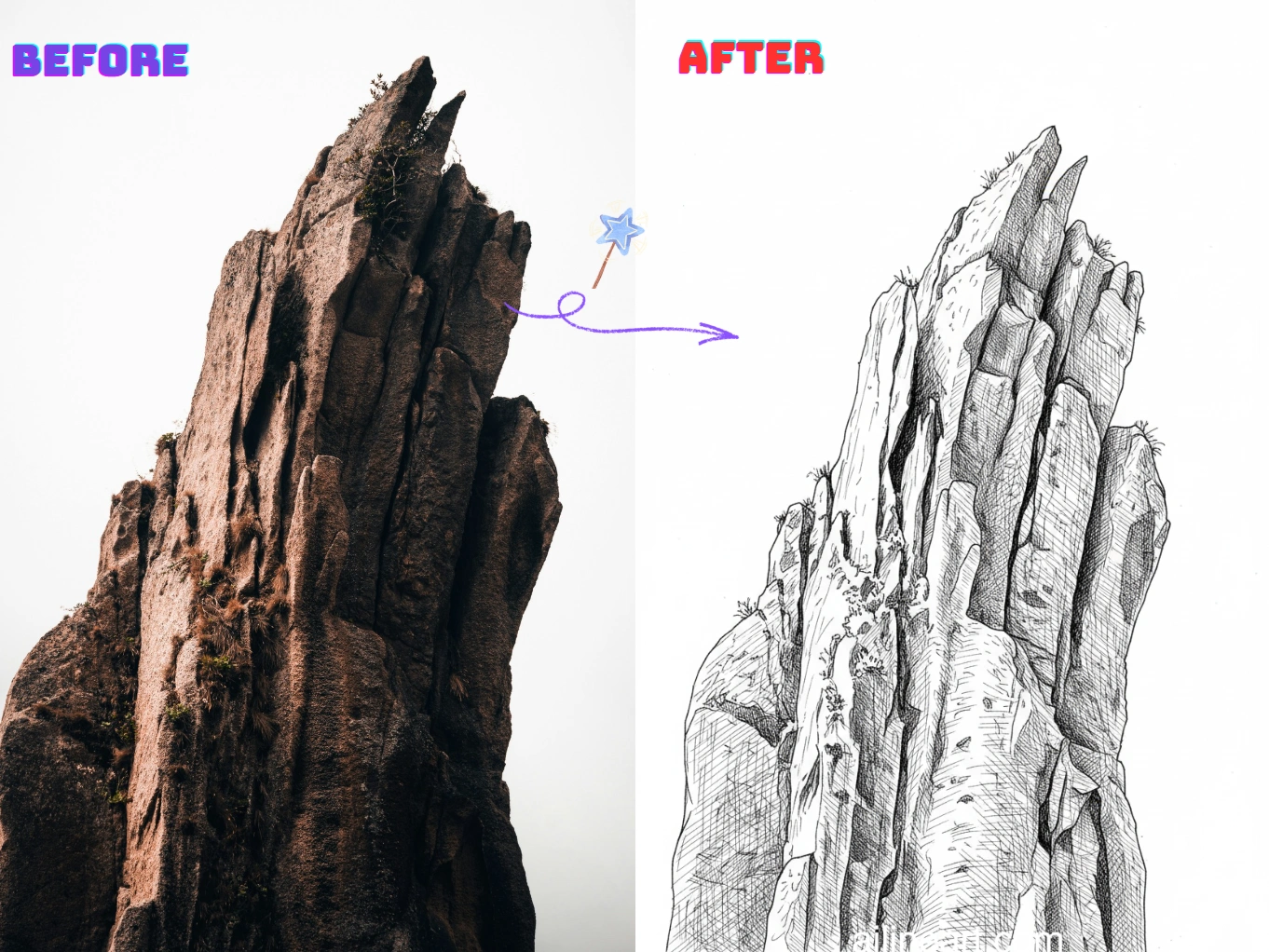
画像からラインアートの活用シーン
写真を数秒できれいで印刷可能なラインアートに変換します。


画像からラインアート ジェネレーターの使い方
画像からラインアート ジェネレーターで線画を生成する簡単な手順

画像をアップロード
画像からラインアート を使用して編集したい画像を選択します。
プロンプトを入力(任意)
画像で変更したい内容を説明します。任意入力です。
ジェネレーターボタンをクリック
ジェネレーターボタンを押してAIジェネレーターを起動し、画像生成プロセスを開始します。
画像をダウンロード
高品質な線画画像をダウンロードして、あなたのプロジェクトに利用できます。
画像からラインアートの機能
画像からラインアートで、どんな写真からもきれいで高品質なラインアートを作成。
クリーンなエッジ検出
写真から不要なごちゃごちゃや背景ノイズを抑えながら、シャープな輪郭を自動抽出。真のラインアートの仕上がりに。
調整可能な線のスタイル
線の太さ、ディテール量、コントラストを制御して、スケッチ・輪郭・ぬりえなど好みのスタイルに合わせられます。
背景の簡略化
複雑なシーンを印刷・トレース・編集しやすい明快な輪郭に簡略化して、被写体を際立たせます。
高解像度エクスポート
印刷、ステッカー、クラフト、デジタルデザインに適したシャープで高解像度のラインアートをダウンロードできます。
高速処理
最適化されたパイプラインで数秒で結果を生成。大量作成や素早い試行錯誤に最適です。
インストール不要
あらゆるデバイスのブラウザで直接使用可能。ダウンロードも設定も不要で、アップロードするだけで生成できます。
今すぐ画像からラインアートを始めよう
画像からラインアートで画像をラインアートに変換するクリエイターの輪に加わりましょう
画像からラインアートジェネレーターが選ばれる理由
なぜ画像からラインアートジェネレーターで画像をきれいなラインアートに変換するのか?
正確な輪郭抽出
AIラインアートジェネレーターが被写体のエッジと重要なディテールを検出し、不要なテクスチャやノイズを抑えながら、シャープで一貫した輪郭を作り出します。
ワンクリックで写真からラインアート
写真をアップロードするだけで、数秒できれいなラインアートを生成。トレースも手動での清書も面倒な設定も不要です。
印刷に最適な結果
クラフト、教材、デザインプロジェクトにそのまま使える、印刷・ぬりえ・トレース・編集しやすい高コントラストの線画を生成します。
画像からラインアート ユーザーに愛されています
毎日 画像からラインアート を使用するクリエイターやプロからの声をご紹介します。
"AI 色付けの精度に驚きました!どこに色を置くべきか完璧に理解していて、グラデーションも美しい。以前は数時間かかっていた作業が、今は数秒です。"

Sarah Chen
デジタルアーティスト
"マンガ制作で最も時間がかかるのは色付けでしたが、このツールなら線からはみ出さず自然な仕上がりになります。非常に助かっています。"

Mike Roberts
マンガ家
"AI 色付けに半信半疑でしたが、画像からラインアート の仕上がりは手描きと見間違えるほど。クライアントにも大好評です。"

Emily Wang
イラストレーター
"コミック制作のワークフローが一変しました。AI が線画構造を理解し、完璧に色付けしてくれます。"

David Kim
コミックアーティスト
"色のバリエーションを試すのに最適!白黒ラフを描いて、そのまま 画像からラインアート で瞬時に色を試せます。"

Lisa Thompson
コンセプトアーティスト
"学生で高価なソフトを買えない私には、本当にありがたいツールです。無料でプロ品質の結果が得られるなんて最高です!"

Alex Martinez
アニメーション学生
よくある質問(QA)
画像からラインアートに関するよくある質問と回答をご覧ください。
01画像からラインアートとは何ですか?
画像からラインアートは、写真をきれいな輪郭線画に変換するAIツールです。シャープな輪郭を抽出し、ディテールを簡略化して本来のラインアートの見た目に仕上げます。
02画像をラインアートに変換するには?
画像(写真やイラスト)をアップロードすると、画像からラインアートが自動でラインアート版を生成します。ディテール量や線の強さなどの設定があれば調整でき、結果をダウンロードできます。
03画像からラインアートへの変換はどのように動作しますか?
AIが画像のエッジ、コントラスト、主要な構造を分析し、簡略化された輪郭に変換します。重要なディテールを保ちながら、不要なテクスチャやノイズを取り除くことが目的です。
04画像からラインアートを使うのに絵のスキルは必要ですか?
いいえ。画像からラインアートは初心者からプロまで使える設計です。画像をアップロードするだけで、手動トレースなしできれいな線画が得られます。
05生成したラインアートを商用利用できますか?
はい、画像からラインアートで生成したラインアートは利用規約に従って商用プロジェクトで使用できます。アップロードする画像の権利はご自身で確認してください。
06どんな画像が最適ですか?
被写体がはっきりしていてコントラストが良い画像が最適です。ポートレート、商品、ペット、シンプルなシーンなど。雑然とした背景や暗い写真は余計な線が出ることがあります。
07ラインアートのディテール量は調整できますか?
はい。通常、ディテール量、線の太さ・強さ、コントラストを調整でき、シンプルな輪郭から細かいスケッチまで自由に作れます。
08対応している画像形式は?
画像からラインアートはPNG、JPG、WEBP形式に対応しています。最良の結果を得るには、くっきりした高解像度の画像をアップロードしてください。
09よりきれいなラインアートを得るには?
照明とコントラストが良い画像を使い、複雑すぎる背景を避け、コントラストを上げたりディテールを減らしたりしてみてください。必要に応じて設定を変えて再生成すれば、よりきれいな輪郭になります。
10アップロードした画像は非公開ですか?
はい、アップロードと生成結果は安全に扱われます。プライバシーを尊重し、許可なくあなたの画像を共有することはありません。
まだ質問がありますか?お問い合わせはこちら: hello@ailineart.com
関連するAIツール
AI Line Art が提供するAIジェネレーターツールをさらに探索

Nano Banana 2
Nano Banana 2 - 高速4K AI画像生成。超ワイド比率、キャラクター一貫性、鮮明なテキストレンダリング、Google検索で正確な参照を取得。

AI ブックカバー生成
タイトルと著者名を読みやすく入れた AI ブックカバーを、Kindle、KDP、Wattpad、自費出版向けに作成。

AI 線画色付け
AI を使って線画を自動で色付け—無料・高速・簡単。画像アップロードと複数スタイルに対応。

画像からラインアート
どんな画像でも簡単にラインアートへ変換。AIによるきれいで使いやすい線画スタイル。

ミニマリストラインアート
AIを使用して任意の画像をエレガントなミニマリストラインアートに変換。高速、無料、簡単。

3D線画
AIジェネレーターで画像を簡単に素晴らしい3D線画に変換。高速処理、使いやすいインターフェース、多様な芸術スタイルが無料で利用可能。

AIスケッチ簡略化
AIを使って乱雑なスケッチを洗練された線画に精製。即座に雑然を除去し、線を滑らかにし、数秒でプロフェッショナルな結果を作成。

AI塗り絵ページジェネレーター
AIで任意の画像を印刷可能な塗り絵ページに変換。シンプルな輪郭から詳細なデザインまで、複数のスタイルでカスタム塗り絵ブックを即座に作成。高速で使いやすい。

AI漫画ジェネレーター
どんなアイデアもAIでマルチコマ漫画に。マンガ・ウェブトゥーン・クラシック風を数秒で生成——無料・登録不要。

AIピクセルアート生成
オンラインでくっきりしたAIピクセルアートを作成。8-bitスプライト、16-bit素材、アイコン、アバター、アイソメシーンを数秒で生成。

AI OCメーカー
AIキャラクタージェネレーターでユニークなOCを瞬時に作成。複数のアートスタイル、参考画像アップロード、超高速作成機能。スキル不要。

AIレイヤー分割
AIでフラットなイラストをきれいな編集可能レイヤーに分割。キャラクター・背景・オブジェクトを数秒で分離し、編集・アニメ・ゲームアートに最適。