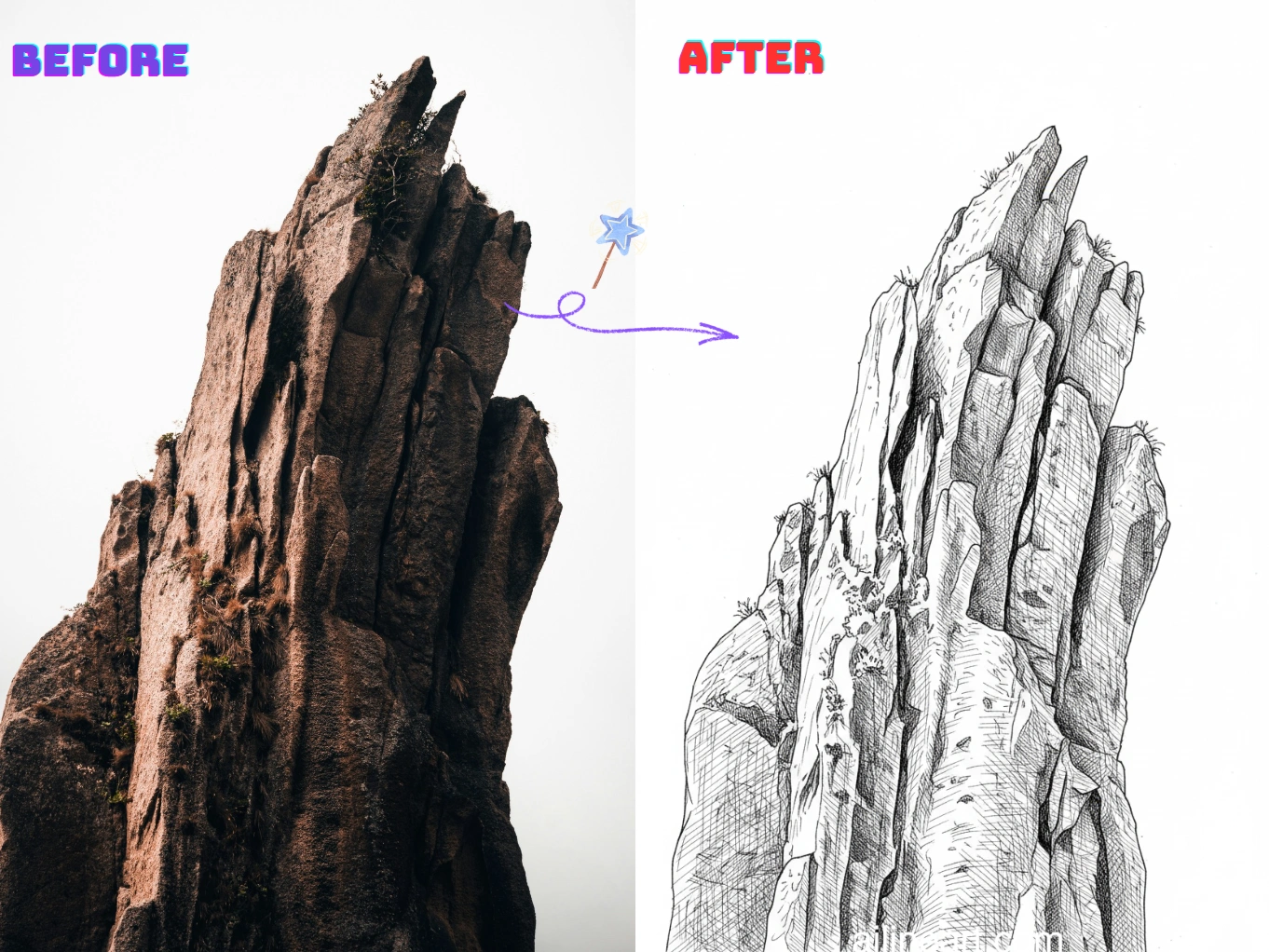
Casi d'uso di Immagine in Line Art
Trasforma le foto in line art pulite e stampabili in pochi secondi.
Da ritratto a disegno a linee
Converti selfie e ritratti in line art morbide con lineamenti nitidi e minimo rumore: perfette per regali, avatar e immagini del profilo.


Contorni di prodotti e oggetti
Crea linee di contorno nette da foto di prodotti e oggetti per manuali, mockup, adesivi e bozze di design: pulite, coerenti e facili da modificare.


Pagine da colorare e stampe fai-da-te
Trasforma animali, paesaggi e scene quotidiane in contorni stampabili per pagine da colorare, lavoretti creativi e materiali scolastici: pronti da scaricare e condividere.


Come usare il generatore Immagine in Line Art
Segui questi semplici passaggi per generare line art con il nostro generatore Immagine in Line Art

Carica la tua immagine
Seleziona l'immagine che vuoi modificare con Immagine in Line Art.
Inserisci un prompt (opzionale)
Descrivi ciò che desideri modificare nell'immagine. Facoltativo.
Clicca sul pulsante generatore
Clicca sul pulsante del generatore per avviare il generatore AI e iniziare la generazione di immagini.
Scarica l'immagine
Scarica la tua immagine line art in alta qualità, pronta per il tuo progetto.
Funzionalità di Immagine in Line Art
Crea line art pulite e di alta qualità da qualsiasi foto con Immagine in Line Art.
Rilevamento dei bordi pulito
Estrai automaticamente contorni netti dalle foto, riducendo il disordine e il rumore di sfondo per un vero effetto line art.
Stile delle linee regolabile
Controlla spessore delle linee, livello di dettaglio e contrasto per ottenere lo stile preferito: schizzo, contorno o pagina da colorare.
Semplificazione dello sfondo
Metti in risalto i soggetti semplificando le scene complesse in contorni chiari, facili da stampare, ricalcare o modificare.
Esportazioni ad alta risoluzione
Scarica line art nitide e ad alta risoluzione, adatte a stampa, adesivi, lavoretti creativi e design digitale.
Elaborazione rapida
Genera risultati in pochi secondi con una pipeline ottimizzata: ideale per creazioni in serie e iterazioni rapide.
Nessuna installazione richiesta
Usa direttamente nel browser su qualsiasi dispositivo: niente download, nessuna configurazione, basta caricare e generare.
Inizia ora con Immagine in Line Art
Unisciti a migliaia di creator che trasformano le immagini in line art con Immagine in Line Art
Perché scegliere il nostro generatore di Immagine in Line Art?
Perché usare il nostro generatore di Immagine in Line Art per trasformare le immagini in line art pulite?
Estrazione accurata dei contorni
Il nostro generatore di line art IA rileva i bordi del soggetto e i dettagli chiave per produrre contorni netti e coerenti, riducendo texture e rumore indesiderati.
Da foto a line art con un clic
Carica una foto e il nostro generatore restituisce line art pulite in pochi secondi: niente ricalco, niente pulizia manuale, niente impostazioni complicate.
Risultati pronti per la stampa
Prodotti disegni a linee ad alto contrasto, facili da stampare, colorare, ricalcare e modificare per lavoretti creativi, schede didattiche e progetti di design.
Amato dagli utenti di Immagine in Line Art
Ecco cosa dicono gli artisti e i professionisti che usano Immagine in Line Art ogni giorno.
"La colorazione IA è incredibile! Capisce esattamente dove applicare il colore e crea gradienti bellissimi. Ciò che prima richiedeva ore, ora richiede pochi secondi."

Sarah Chen
Artista digitale
"Come artista manga, colorare è sempre stato il processo più lungo. Immagine in Line Art fa un lavoro perfetto: colori puliti e ombre naturali."

Mike Roberts
Autore di manga
"Ero scettica riguardo alla colorazione IA, ma Immagine in Line Art mi ha stupita. I risultati sembrano dipinti a mano — i miei clienti adorano i colori vivaci!"

Emily Wang
Illustratrice
"Questo strumento ha rivoluzionato il mio workflow. L'IA comprende la struttura del disegno e applica i colori in modo intelligente."

David Kim
Artista di fumetti
"Perfetto per iterazioni rapide! Schizzo in bianco e nero e uso Immagine in Line Art per provare varie palette colore."

Lisa Thompson
Concept artist
"Da studente non posso permettermi software costosi. Immagine in Line Art mi offre colorazioni professionali gratuitamente!"

Alex Martinez
Studente di animazione
Domande frequenti (QA)
Esplora le domande e le risposte più comuni su Immagine in Line Art.
01Che cos'è Immagine in Line Art?
Immagine in Line Art è uno strumento IA che converte le foto in disegni a linee puliti. Estrae contorni nitidi e semplifica i dettagli per un vero effetto line art.
02Come si converte un'immagine in line art?
Carica la tua immagine (foto o illustrazione) e Immagine in Line Art genererà automaticamente la versione in line art. Se disponibili, puoi regolare impostazioni come il livello di dettaglio o l'intensità delle linee, poi scaricare il risultato.
03Come funziona la conversione da immagine a line art?
La nostra IA analizza bordi, contrasto e strutture chiave della tua immagine, poi li trasforma in contorni semplificati. L'obiettivo è mantenere i dettagli importanti eliminando texture e rumore superflui.
04Serve sapere disegnare per usare Immagine in Line Art?
No. Immagine in Line Art è pensato per principianti e professionisti: basta caricare un'immagine e ottenere un disegno a linee pulito senza ricalco manuale.
05Posso usare la line art generata a fini commerciali?
Sì, la line art generata con Immagine in Line Art può essere usata per progetti commerciali secondo i nostri termini di servizio. Assicurati di avere i diritti sulle immagini che carichi.
06Quali immagini funzionano meglio?
Le immagini con soggetti chiari e buon contrasto danno i migliori risultati: ritratti, prodotti, animali e scene semplici. Sfondi molto caotici o foto in condizioni di poca luce possono produrre linee extra.
07Posso controllare il livello di dettaglio della line art?
Sì. In genere puoi regolare il livello di dettaglio, lo spessore o l'intensità delle linee e il contrasto per creare qualsiasi cosa, dai contorni essenziali agli schizzi più dettagliati.
08Quali formati immagine sono supportati?
Immagine in Line Art supporta i formati PNG, JPG e WEBP. Per risultati ottimali, carica un'immagine nitida e ad alta risoluzione.
09Come posso ottenere line art più pulite?
Usa immagini con buona illuminazione e contrasto, evita sfondi troppo complessi e prova ad aumentare il contrasto o ridurre i dettagli. Se serve, rigenera con impostazioni diverse per un contorno più pulito.
10Le mie immagini caricate sono private?
Sì, upload e risultati generati sono gestiti in modo sicuro. Rispettiamo la tua privacy e non condividiamo le tue immagini senza permesso.
Hai ancora domande? Contattaci a hello@ailineart.com
Strumenti IA correlati
Scopri altri strumenti generatore AI alimentati da AI Line Art

Nano Banana 2
Nano Banana 2 - Generazione di immagini AI 4K velocissima. Aspect ratio ultra-wide, coerenza dei personaggi, rendering testo nitido e Google Search per riferimenti accurati.

Generatore di copertine IA
Crea copertine IA con titolo e autore leggibili per Kindle, KDP, Wattpad e self-publishing.

Colorazione Line Art con IA
Colora il tuo line art con l'IA — gratis, veloce e senza sforzo. Supporta caricamento immagini e vari stili di colorazione.

Immagine in Line Art
Trasforma qualsiasi immagine in line art con facilità. Conversione basata su IA con stili puliti e pronti all’uso.

Arte Lineare Minimalista
Trasforma qualsiasi immagine in elegante arte lineare minimalista usando l'AI. Veloce, gratuito e facile.

Arte Lineare 3D
Converti immagini in straordinaria arte lineare 3D senza sforzo con il nostro generatore IA. Elaborazione veloce, interfaccia intuitiva e diversi stili artistici disponibili gratuitamente.

Semplificazione Schizzi IA
Affina schizzi disordinati in arte lineare raffinata con l'IA. Rimuovi istantaneamente il disordine, leviga le linee e crea risultati professionali in pochi secondi.

Generatore di Pagine da Colorare IA
Trasforma qualsiasi immagine in pagine da colorare stampabili con l'IA. Crea libri da colorare personalizzati istantaneamente con molteplici stili - da contorni semplici a design dettagliati. Veloce e facile da usare.

Generatore di fumetti IA
Trasforma ogni idea in una striscia a fumetti multi-vignetta con l IA. Stili manga, webtoon e classico in secondi — gratis, senza registrazione.

Generatore AI di pixel art
Crea pixel art nitida online. Genera sprite 8-bit, asset 16-bit, icone, avatar e scene isometriche in pochi secondi.

Generatore di OC con IA
Crea istantaneamente OC unici con il generatore di personaggi IA. Molteplici stili artistici, caricamento di immagini di riferimento e creazione ultrarapida. Nessuna competenza richiesta.

Separazione livelli con IA
Dividi illustrazioni piatte in livelli puliti e modificabili con IA — separa personaggi, sfondi e oggetti in pochi secondi.