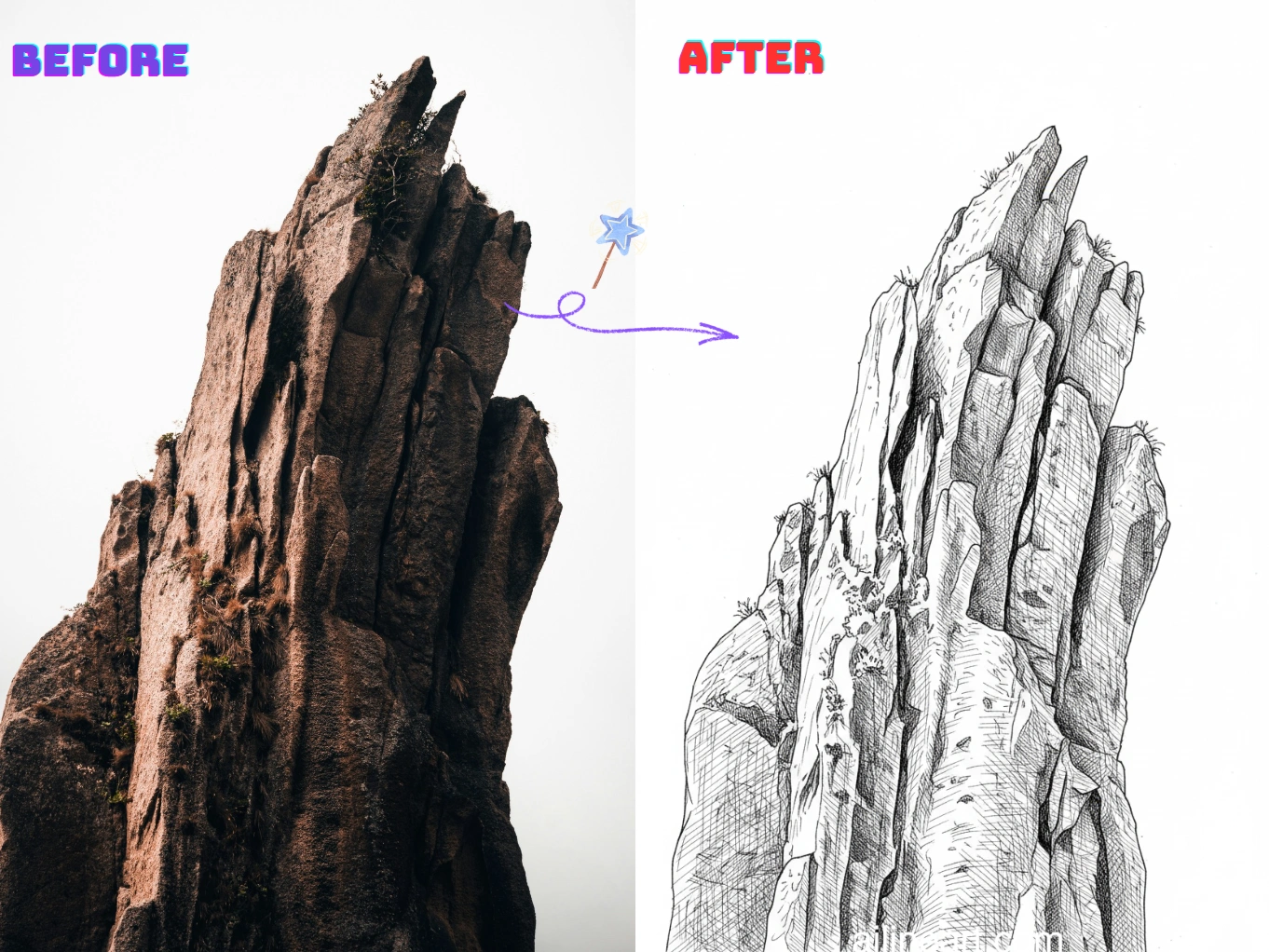
Casos de Uso de Imagen a Arte Lineal
Convierte fotos en arte lineal limpio y listo para imprimir en segundos.
Retrato a Dibujo Lineal
Convierte selfies y retratos en arte lineal suave con rasgos faciales claros y mínimo ruido: perfecto para regalos, avatares e imágenes de perfil.


Contornos de Productos y Objetos
Crea líneas de contorno nítidas a partir de fotos de productos para manuales, maquetas y bocetos: limpio, consistente y fácil de editar.


Páginas para Colorear y DIY
Transforma mascotas y paisajes en contornos imprimibles para páginas de colorear, manualidades y materiales escolares.


Cómo usar el generador Imagen a Arte Lineal
Sigue estos sencillos pasos para generar line art con nuestro generador Imagen a Arte Lineal

Sube tu imagen
Selecciona la imagen que deseas modificar con Imagen a Arte Lineal.
Introduce una indicación (opcional)
Describe lo que deseas cambiar en la imagen. Opcional.
Haz clic en el botón generador
Haz clic en el botón del generador para iniciar el generador de IA y comenzar el proceso de generación de imágenes.
Descarga la imagen
Descarga tu imagen de line art en alta calidad, lista para usar en tu proyecto.
Características de Imagen a Arte Lineal
Crea arte lineal limpio y de alta calidad a partir de cualquier foto con Imagen a Arte Lineal.
Detección de Bordes Limpia
Extrae automáticamente contornos nítidos de las fotos mientras reduce el desorden y el ruido de fondo para un aspecto de arte lineal auténtico.
Estilo de Línea Ajustable
Controla el grosor de la línea, el nivel de detalle y el contraste para que coincida con tu estilo preferido de boceto, contorno o página para colorear.
Simplificación del Fondo
Haz que los sujetos destaquen simplificando escenas complejas en contornos claros que son fáciles de imprimir, calcar o editar.
Exportaciones en Alta Resolución
Descarga resultados de arte lineal nítidos y en alta resolución, adecuados para impresión, pegatinas, manualidades y diseño digital.
Procesamiento Rápido
Genera resultados en segundos con un proceso optimizado, ideal para la creación por lotes y la iteración rápida.
No Requiere Instalación
Úsalo directamente en tu navegador en cualquier dispositivo: sin descargas, sin configuración, solo sube y genera.
Empieza con Imagen a Arte Lineal Ahora
Únete a miles de creadores que convierten imágenes en arte lineal con Imagen a Arte Lineal
¿Por qué elegir nuestro generador Imagen a Arte Lineal?
¿Por qué usar nuestro generador Imagen a Arte Lineal para convertir imágenes en line art limpio?
Extracción de Contornos Precisa
Nuestro generador de line art de IA detecta los bordes del sujeto y los detalles clave para producir contornos nítidos y consistentes.
Generador de foto a line art con un clic
Sube una foto y nuestro generador de line art entrega line art limpio en segundos: sin calcar, sin limpieza manual y sin configuraciones complicadas.
Resultados Listos para Imprimir
Usa el generador para producir dibujos lineales de alto contraste que son fáciles de imprimir, colorear, calcar y editar para manualidades y diseños.
Amado por los usuarios de Imagen a Arte Lineal
Opiniones de creadores y profesionales que usan Imagen a Arte Lineal diariamente.
"¡La colorización de line art con IA es increíble! Entiende perfectamente dónde aplicar color y genera hermosos degradados. Lo que antes tomaba horas, ahora toma segundos."

Sarah Chen
Artista digital
"Como artista de manga, colorear siempre era la parte más lenta. Esta herramienta maneja la colorización perfectamente: los colores no se salen de las líneas y las sombras se ven naturales."

Mike Roberts
Creador de manga
"No confiaba mucho en la colorización con IA al principio, pero Imagen a Arte Lineal me sorprendió. ¡Los resultados parecen pintados a mano y mis clientes adoran los colores vibrantes!"

Emily Wang
Ilustradora
"Esta herramienta ha revolucionado mi flujo de trabajo. La IA entiende la estructura de la línea y aplica color inteligentemente, permitiéndome producir más sin perder calidad."

David Kim
Ilustrador de cómics
"¡Perfecto para iteración rápida! Hago bocetos en blanco y negro y uso Imagen a Arte Lineal para probar diferentes esquemas de color al instante."

Lisa Thompson
Artista conceptual
"Como estudiante no puedo pagar software caro. Imagen a Arte Lineal me da resultados profesionales gratis. ¡Perfecto para mi portafolio!"

Alex Martinez
Estudiante de animación
Preguntas Frecuentes (FAQ)
Explora preguntas y respuestas comunes sobre Imagen a Arte Lineal.
01¿Qué es Imagen a Arte Lineal?
Imagen a Arte Lineal es una herramienta de IA que convierte fotos en dibujos de contorno limpios. Extrae contornos nítidos y simplifica los detalles para un aspecto de arte lineal auténtico.
02¿Cómo convierto una imagen a arte lineal?
Sube tu imagen y Imagen a Arte Lineal generará una versión de arte lineal automáticamente. Puedes ajustar configuraciones como el nivel de detalle y descargar el resultado.
03¿Cómo funciona la conversión?
Nuestra IA analiza bordes, contraste y estructuras clave en tu imagen, y luego los convierte en contornos simplificados, manteniendo los detalles importantes.
04¿Necesito saber dibujar para usar Imagen a Arte Lineal?
No. Imagen a Arte Lineal está diseñado para principiantes y profesionales: solo sube una imagen y obtén un dibujo lineal limpio sin necesidad de calcar manualmente.
05¿Puedo usar el arte lineal generado comercialmente?
Sí, el arte lineal generado con Imagen a Arte Lineal se puede usar para proyectos comerciales según nuestros términos de servicio.
06¿Qué imágenes funcionan mejor?
Las imágenes con sujetos claros y buen contraste funcionan mejor: retratos, productos, mascotas y escenas simples.
07¿Puedo controlar el nivel de detalle?
Sí. Normalmente puedes ajustar el nivel de detalle, el grosor de la línea y el contraste para crear desde contornos minimalistas hasta bocetos detallados.
08¿Qué formatos de imagen son compatibles?
Imagen a Arte Lineal admite formatos PNG, JPG y WEBP. Para obtener los mejores resultados, sube una imagen clara y de alta resolución.
09¿Cómo puedo obtener resultados más limpios?
Usa imágenes con buena iluminación y contraste, evita fondos demasiado complejos y prueba a aumentar el contraste o reducir el detalle.
10¿Es privada mi imagen subida?
Sí, tus cargas y resultados generados se manejan de forma segura. Respetamos tu privacidad y no compartimos tus imágenes sin permiso.
¿Aún tienes preguntas? Escríbenos a hello@ailineart.com
Herramientas de IA relacionadas
Explora más herramientas de generador de IA desarrolladas por AI Line Art

Nano Banana 2
Nano Banana 2: generación de imágenes con IA en 4K a velocidad ultrarrápida. Proporciones ultraanchas, coherencia de personajes, texto nítido y Google Search para referencias precisas.

Generador de portadas con IA
Crea portadas con IA y tipografía clara para Kindle, KDP, Wattpad y autopublicación.

Colorización de Line Art con IA
Coloriza tu line art con IA — gratis, rápido y fácil. Compatible con subida de imágenes y múltiples estilos.

Imagen a Arte Lineal
Convierte cualquier imagen en arte lineal sin esfuerzo. Conversión impulsada por IA con múltiples estilos, resultados rápidos y bajo costo.

Arte Lineal Minimalista
Convierte cualquier imagen en elegante arte lineal minimalista usando IA. Rápido, gratis y fácil.

Arte de Líneas 3D
Convierte imágenes en impresionante arte de líneas 3D sin esfuerzo con nuestro generador de IA. Procesamiento rápido, interfaz fácil de usar y diversos estilos artísticos disponibles gratis.

Simplificación de Bocetos con IA
Refina bocetos desordenados en arte lineal pulido con IA. Elimina instantáneamente el desorden, suaviza las líneas y crea resultados profesionales en segundos.

Generador de Páginas para Colorear IA
Transforma cualquier imagen en páginas para colorear imprimibles con IA. Crea libros para colorear personalizados al instante con múltiples estilos - desde contornos simples hasta diseños detallados. Rápido y fácil de usar.

Generador de cómics con IA
Convierte cualquier idea en una tira cómica de varios paneles con IA. Estilos manga, webtoon y clásico en segundos — gratis, sin registro.

Generador de pixel art con IA
Crea pixel art nítido online. Genera sprites 8-bit, assets 16-bit, iconos, avatares y escenas isométricas en segundos.

Generador de OC con IA
Crea OCs únicos al instante con el generador de personajes con IA. Múltiples estilos artísticos, carga de imágenes de referencia y creación ultrarrápida. No se requieren habilidades.

Separación de capas con IA
Divide ilustraciones planas en capas limpias y editables con IA — separa personajes, fondos y objetos en segundos.